Very simple... when u select 8xAA in crysis.
For ati it loads 8xMSAA
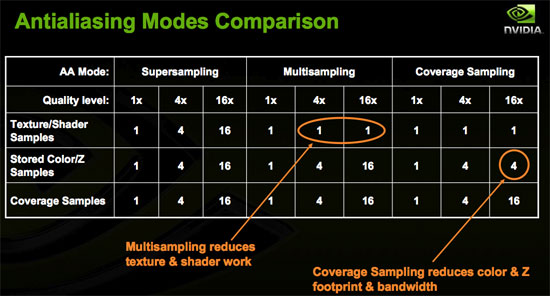
and on nvdia it loads 4xMSAA & 8xCSAA.. its Nvdia trick... they spend a lot of money to make game developers support NV
You will find a file called FSAAProfilesDX10.txt and FSAAProfile.txt in config folder.
Delete both files and then you will notice, both cards will use MSAA
After deleting that file, you will not see 8xq 16x or 16xq
Even for
Nvidia will only get 2x, 4x, 8x, which is real 8x MSAA.
now compair with ATI.
when that file is there. when you select 8x it lodes 8x msaa for ATI and lodes 4x msaa for Nvidia....
not only crysis... even in CMR grid you have simular file.....
ry this.. you can make a
Nvidia card use MSAA like
ATi.. then you can do a real test on ATI and Nvidia with Crysis..
Nvidia always wins in crysis because of using this file i mentioned
There are two files
For DX9 the file is FSAAProfiles.txt
And for DX10 the file is FSAAProfilesDX10.txt
The original file is says this
MSAA is standerd and CSAA is Nvidia only.. when you select 8x in crysis or grid or any game which gives you the option of Qx. it is not real AA..
when you select 8x in crysis, it selects 4x sample and 8x Quality for Nvidia and 8x sample for ATI
Even you do that in ATI, Go to ccc and uncheck the AA and select 4x sample and x8 quality (8X AA with Wide Tent Filtering) and you will see the FPS is better than what you get,.. but in game the AA should be turnedoff.. or els it will do AA over AA and the FPS will fall to 10 FPS... lol
NVIDIA
8x = 4xMSAA + 8CSAA
8xQ = 8xMSAA + 8CSAA
16x = 4xMSAA + 16CSAA
16xQ = 8xMSAA + 16CSAA
ATI
4x = 4xMSAA
8x = 8xMSAA
OTHER SAMPLS FOR
ATI
2x = 2xMSAA + 4x 6xCFAA
4x = 4xMSAA + 8x 12xCFAA
8x = 8x MSAA +16x CFAA
8x = 8x MSAA + 24 ED CFAA
====================================================
Original File.. which loads q for Nv card
Version (1.00)
DeviceGroupID 'NVIDIA'
{
VendorID = 4318 // NVidia
Devices
{
MinID = 0x0000
MaxID = 0xFFFF
}
}
FSAAProfile 'CSAA'
{
DeviceGroup = NVIDIA
Mode
{
Samples = 4
Quality = 8
Desc '8x'
}
Mode
{
Samples = 8
Quality = 8
Desc '8xQ'
}
Mode
{
Samples = 4
Quality = 16
Desc '16x'
}
Mode
{
Samples = 8
Quality = 16
Desc '16xQ'
}
}
====================================================
My edited version for ATI is here and also makes Nvidia use the same setting what ATi gets
====================================================
Version (1.00)
DeviceGroupID 'ATI'
{
VendorID = 4098 // ATI
Devices
{
MinID = 0x0000
MaxID = 0xFFFF
}
}
FSAAProfile 'CFAA'
{
DeviceGroup = ATI
Mode
{
Samples = 8
Quality = 0
Desc '8xAA'
}
}
FSAAProfile 'CSAA'
{
DeviceGroup = NVIDIA
Mode
Mode
{
Samples = 8
Quality = 0
Desc '8xAA'
}
}
====================================================
To check the settings, after applying AA, click on ~ key for opening the conaole and it will say
FSAA = 1
FSAA_sample = 8
FSAA_quality = 0
And if sample is 4, then 4x AA and if the sample says 8, its 8xAA-- which is pure MSAA. now ready everything is ready.......
My edited version will make Nvidia use the original MSAA like ATI card
AND TO ADD GPU IN THE GPU LIST
Edit the file amd.txt which is inside Crysis\Game\Config\gpu
Add the following line if you are using New ATI cards
0x1002, 0x9441, 4 // ATI Radeon HD 4870 X2
0x1002, 0x9440, 4 // AMD Radeon HD 4870
0x1002, 0x9442, 4 // AMD Radeon HD 4850
0x1002, 0x9508, 3 // AMD Radeon HD 3870
0x1002, 0x9504, 3 // AMD Radeon HD 3850
0x1002, 0x950F, 4 // AMD Radeon HD 3870 x2
After you add these lines... when u click on optimize the game.. you will get very high as default setting for all x2's and 4800 series........