Pasquale Guglielmo
Nuovo Utente
- Messaggi
- 2
- Reazioni
- 0
- Punteggio
- 1
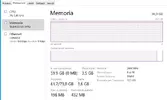
Hi all, in these days I upgraded the RAM to a Windows server. It started to 64 GB and with the upgrade of 32 GB (2 x 16 GB) sticks I allowed the server to have more RAM. But unluckly for me, the whole addition went to be "allocated to hardware".
I'll be more specific here:
The MBU's server has 16 stick of RAM, 4 of them were already fullfied giving the 64 GB of RAM.
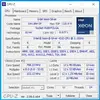
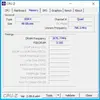
The RAM slots are (all) RDIMM DDR4 3200Mhz (which are not fully used and limited to 2666Mhz due to processor limitations).
The previuos 4 slots were also RDIMM with same caratteristics, only difference is the home producer (Samsung, Crucial, ...)
I can see through applications like "System Information", "Task Manager", "Resource Manager" that it has installed 96GB (correct), and these 32.5 GB dedicated to hardware. Via System Informations I can see that it has ~73GB virtually allocated.
I dont know, I tried many solutions, searching though web, youtube and more. Touchign the msconfig, the maximum memory to use (automatically reading the whole ram) or the advanced settings of Windows... but nothing worked... so what I can do?
I'll be more specific here:
The MBU's server has 16 stick of RAM, 4 of them were already fullfied giving the 64 GB of RAM.
The RAM slots are (all) RDIMM DDR4 3200Mhz (which are not fully used and limited to 2666Mhz due to processor limitations).
The previuos 4 slots were also RDIMM with same caratteristics, only difference is the home producer (Samsung, Crucial, ...)
I can see through applications like "System Information", "Task Manager", "Resource Manager" that it has installed 96GB (correct), and these 32.5 GB dedicated to hardware. Via System Informations I can see that it has ~73GB virtually allocated.
I dont know, I tried many solutions, searching though web, youtube and more. Touchign the msconfig, the maximum memory to use (automatically reading the whole ram) or the advanced settings of Windows... but nothing worked... so what I can do?