Ciao,
ho installato raspbian e ho purtroppo però dei problemi con questa guida:
https://pimylifeup.com/raspberry-pi-nas/
L'ho seguita e ricontrollata più volte e sono abbastanza sicuro di non aver commesso errori.
L'unica differenza è nel file smb:
- Now let’s edit the config file by entering the following:
sudo nano /etc/samba/smb.conf
- There are several edits we will need to make to this file, first remove the # from thesecurity = user line.
- Next we will need to add our hard drive to the samba config file. Enter the following to add your hard drive as a share (Update the path if you have something different):
[NAS]
comment = NAS Folder
path = /media/NASHDD1
valid users = @users
force group = users
create mask = 0660
directory mask = 0771
read only = no
Nella sezione authentication non trovo security = user
e allora l'ho messo nella sezione successiva, nella riga sopra [NAS].
Sempre lì dove c'è [NAS] c'erano dei ; prima di ogni riga e li ho eliminati.
Ho nominato il drive 0AC8-41C1
Cosa posso fare? :(
Se su Windows vado su Rete non trovo il Raspberry.
Grazie mille!
EDIT:
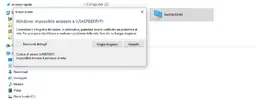
Ora me lo trova su Rete ma mi dice impossibile accedere.
Visualizza allegato 219515
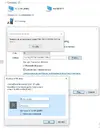
Ho provato anche questa strada ma con user pi e psw raspberry che ho impostato non accedo.
Visualizza allegato 219520