PROBLEMA Msi x570 gaming plus

Pubblicità

Marcellino Colonna

Nuovo Utente
Messaggi
9
Reazioni
1
Punteggio
24
Buonasera a tutti ragazzi, volevo chiedervi un opinione riguardo a questa scheda madre...
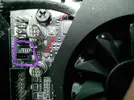
Praticamente l'ho acquistata e ho assemblato tutto il pc e ho notato anche nei settaggi nel bios delle ventole che il dissipatore piccolino frozr che monta va costantemente a piu di 5000 rpm anche se le temperature sono di 40 gradi ed è impostata su silent
Ho aggiornato il bio ma niente, è difettosa secondo voi? O posso provare altro?IMG_20200822_144213.webp

Inviato da Redmi Note 9S tramite App ufficiale di Tom\'s Hardware Italia Forum
 
Pare tu non sia l' unico ed, in questi 4 casi ( tutti relativi a mainboard msi), il problema è di assemblaggio


I had same issue with MSI X570 GAMING EDGE WIFI. Chipset were running 100% (~5600 rpm) since day one. No matter what modes I changed in BIOS (manual, silent, balanced) it just stayed constantly at around 5600 rpm. At first I didn't even noticed that, and I thought my PC is so noisy because of 6 other fans. Until my friend bought same motherboard and we started to talk about fan speeds, and he said his chipset fan doesn't even spin until 75C+ . I was like "wtf", mine is constantly at 5600 rpm.

So I started to look for issues. Started with BIOS updates, reset defaults, unplugged chipset fan etc. Nothing helped.

Until, I closely inspected chipset fan socket and noticed that socket has 3 pin needles on motherboard, but fan header has 4 pin holes. Socket is so small that you can barely inspect it, and just on corner I barely noticed bent 4th pin needle. I carefully bent it back with needle and carefully plugged fan header back in and IT WORKED! Now chipset fan modes works perfectly and its controllable, and suddenly my PC is so silent.

It means that socket pins were bent already from factory, because fan header were pre-installed and plugged in already when I unboxed my motherboard.

.
.
.


Poco sotto:

@CodeKJ I had the same exact problem today. The chipset fan was stuck at max RPM no matter what I did in the BIOS. I did what you suggested and pulled out the header for the fan. Sure enough, only 3 were connected and the 4th was bent just as you described. I had to disconnect and remove the motherboard from the case entirely in order to get a good angle and some light in there, but I managed to use a needle to bend the pin back and reconnect the header properly. The fan is now working fine.

I don't know who or what connects that header in the factory, but the process is clearly broken. The header was jammed in there with that 4th pin bent to the side.


Nel caso tu non sappia l' inglese: questi 4 ragazzi hanno trovato il quarto pin del connettore della ventola piegato e non inserito correttamente nell' header sulla scheda madre.
Prova a controllare: nel caso piegalo dolcemente e riportalo in sede.

In verde il connettore da controllare
MSI-MPG-X570-Gaming-Plus-2.webp
 
Ultima modifica:
Pare tu non sia l' unico ed, in questi 4 casi ( tutti relativi a mainboard msi), il problema è di assemblaggio


I had same issue with MSI X570 GAMING EDGE WIFI. Chipset were running 100% (~5600 rpm) since day one. No matter what modes I changed in BIOS (manual, silent, balanced) it just stayed constantly at around 5600 rpm. At first I didn't even noticed that, and I thought my PC is so noisy because of 6 other fans. Until my friend bought same motherboard and we started to talk about fan speeds, and he said his chipset fan doesn't even spin until 75C+ . I was like "wtf", mine is constantly at 5600 rpm.

So I started to look for issues. Started with BIOS updates, reset defaults, unplugged chipset fan etc. Nothing helped.

Until, I closely inspected chipset fan socket and noticed that socket has 3 pin needles on motherboard, but fan header has 4 pin holes. Socket is so small that you can barely inspect it, and just on corner I barely noticed bent 4th pin needle. I carefully bent it back with needle and carefully plugged fan header back in and IT WORKED! Now chipset fan modes works perfectly and its controllable, and suddenly my PC is so silent.

It means that socket pins were bent already from factory, because fan header were pre-installed and plugged in already when I unboxed my motherboard.

.
.
.


Poco sotto:

@CodeKJ I had the same exact problem today. The chipset fan was stuck at max RPM no matter what I did in the BIOS. I did what you suggested and pulled out the header for the fan. Sure enough, only 3 were connected and the 4th was bent just as you described. I had to disconnect and remove the motherboard from the case entirely in order to get a good angle and some light in there, but I managed to use a needle to bend the pin back and reconnect the header properly. The fan is now working fine.

I don't know who or what connects that header in the factory, but the process is clearly broken. The header was jammed in there with that 4th pin bent to the side.


Nel caso tu non sappia l' inglese: questi 4 ragazzi hanno trovato il quarto pin del connettore della ventola piegato e non inserito correttamente nell' header sulla scheda madre.
Prova a controllare: nel caso piegalo dolcemente e riportalo in sede.

In verde il connettore da controllare
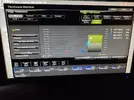
Grazie mille per l'aiuto, cmq ho appena controllato e i pin mi sembrano dritti quindi non credo sia per quel motivo IMG_20200823_070008.webp

Inviato da Redmi Note 9S tramite App ufficiale di Tom\'s Hardware Italia Forum
 
Ok. Solo una cosa: nel tuo screen precedente vedo la ventola selezionata a destra ma la temp della cpu a sinistra.
L' hai impostata correttamente, in relazione alla temp del chipset e non della cpu?
Sisi se vedi nell'immagine c'è selezionato in temperature source chipset (alla fine non si puo nemmeno cambiare c'è solo quella come scelta)

Mi sapresti consigliare qualcos'altro o me la faccio sostituire dicendo che è difettosa?

Inviato da Redmi Note 9S tramite App ufficiale di Tom\'s Hardware Italia Forum
 
Pubblicità
Pubblicità
Indietro
Top