PROBLEMA Computer che si riavvia

Pubblicità

geb95

Utente Èlite
Messaggi
4,366
Reazioni
580
Punteggio
131
Non apendo bene dove postare questa discussione lo pstata qui.
Andiamo al dunque ,praticamente oggi mi si è riavviato 3 volte il pc nell'alrco della giorna(da stamattina a ora)la prima volta si è riavviato mentre non stavo facendo praticamente nulla ,avevo lasciato il pc acceso mentre ero affare altro(nel metre stavo scaricando Neverwinter) ,invece la seconda volta stavo giocando a Hitman e la 3 (poco fà) stavo giocando ad Amnesia
Mi potete aiutare?

P.S.Dopo che si riavvia all'accenzione mi spunta questo messaggioproblem.webp

Grazie in anticipo
P.P.S.Il pc l'ho da circa 2 mesi o meno

- - - Updated - - -

Nessuno?

Ho dimenticato a scrivere che l'ultima volta che è successo è spuntata una scermata blu

P.S.Da quando ho finito il download di neverwiter ho il pc acceso da circa 10 ore e ancora non si è riavviato
 
Ultima modifica:
ti ha bsoddato, servirebbe sapere l'errore...

Non ricordo perche la pna volta non ero presente mentre quando stavo gicando a hitman e come se si é bloccato il gioco nel caricamento ed é spuntata una schermata rossa(il rosso di hitman) e la terza non ho fatto in tempo in tempo ,anzi propio non ci ho penzato di prendere il codice ,mi sembra che c`éra scritto di qualche probblema ,magari se trovo una screen su google te la posto ,comunque da quando ho finito il download del gioco citato prima in circa 12/13 ore non é successo niente e ho anche giocato a hitman

Ma per caso potrebbe essere una cosa grave ,cioè in cosa consiste il blue screen?

Ecco uno screen
http://www.google.it/imgres?um=1&hl=it&biw=1920&bih=919&tbm=isch&tbnid=biGvCpxVIzN_TM:&imgrefurl=http://notebookitalia.it
,in italiano non l'ho trovato e probabbilmente l'errore non era questo ma la frase è la stessa(almeno credo)/windows-8-uno-smile-sulla-schermata-blu-12680&docid=epLugOwsBCZ9GM&imgurl=http://notebookitalia.it/images/stories/windows_8_bsod.jpg&w=600&h=369&ei=ZzaWUYiKIsfrPKefgKgM&zoom=1&ved=1t:3588,r:0,s:0,i:81&iact=rc&dur=468&page=1&tbnh=174&tbnw=283&start=0&ndsp=30&tx=169&ty=72
 
Ultima modifica:
No ,nessun overclock
ora scarico bsod viewer

- - - Updated - - -

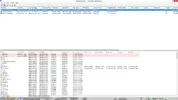
Ecco lo screen ,io non ci capisco niente:asd:
bsod.webp
 
A che risoluzione è? Io la vedo microscopica

Sendato dal mio bellissimo xperia u :love:
 
Io ho il monitor 1080p quindi credo che dovrebbe essere 1080p ,se la clicchi la vedi grande o almeno da pc è così
 
scarica who crashed che è migliore ma se è quello il bsod sembrano essere le ram fai un memtestx86 e tasta la ram
 
Le ram:(?
Cos'é memtestx86 ,è un programma?
Comunque oggi non è più capitato ,non può essere un semplie errore?
Non può essere che bsod viewer si sbagli ,perche ripeto solo mentre scaricavo neverwinter mi è successo ,poi mai più(con la mia connessione ci sono stato un intera giornata a scaricarlo:sisi:)

P.S.Come ram ho le corsair vengenca da 1600
questevengeancemodule_kx2.webp2x4gb

- - - Updated - - -

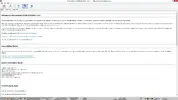
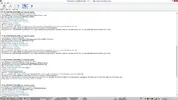
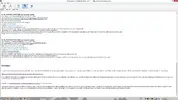
Ecco ciò che mi spunta con who crashed
ecco tre screen
crash1.webpcrash2.webpcrash3.webpcon l'inglese non sono molto pratico quindi non ho capito cuasi niente:asd:

Spero solo non sia un probblema grave perche andare di RMA per le ram che hanno circa 2 mesi mi secca non poco ,comunque oggi ho giocato ad amnesia ,hitman absolution e neverwiter(questo anche ieri notte dopo essersi scaricato) e non ho avuto probblemi ,in media il pc sta acceso tutto il giorno e in alcuni casi lo spengo tipo se vado a riposarmi ecc

Aspetto una risposta ,che fa bsod viewer lo cancello e lascio who crashed?
 
Ultima modifica:
Ecco il testo ,non ci avevo penzato:asd:

[FONT=Segoe UI, Arial]Welcome to WhoCrashed (HOME EDITION) v 4.01
[/FONT]
[FONT=Segoe UI, Arial]This program checks for drivers which have been crashing your computer. If your computer has displayed a blue screen of death, suddenly rebooted or shut down then this program will help you find the root cause and possibly a solution.

Whenever a computer suddenly reboots without displaying any notice or blue screen of death, the first thing that is often thought about is a hardware failure. In reality, on Windows most crashes are caused by malfunctioning device drivers and kernel modules. In case of a kernel error, many computers do not show a blue screen unless they are configured for this. Instead these systems suddenly reboot without any notice.

This program will analyze your crash dumps with the single click of a button. It will tell you what drivers are likely to be responsible for crashing your computer. It will report a conclusion which offers suggestions on how to proceed in any situation while the analysis report will display internet links which will help you further troubleshoot any detected problems.
[/FONT]
[FONT=Segoe UI, Arial]To obtain technical support visit www.resplendence.com/support

[/FONT][FONT=Segoe UI, Arial]Click here to check if you have the latest version or if an update is available.

[/FONT][FONT=Segoe UI, Arial]Just click the Analyze button for a comprehensible report ...


[/FONT][FONT=Segoe UI, Arial]
Home Edition Notice

[/FONT]
[FONT=Segoe UI, Arial]This version of WhoCrashed is free for use at home only. If you would like to use this software at work or in a commercial environment you should get the professional edition of WhoCrashed which also allows analysis of crashdumps on remote drives and computers on the network and offers a range of additional features.

Click here for more information on the professional edition.
Click here to buy the the professional edition of WhoCrashed.
[/FONT]
[FONT=Segoe UI, Arial]
System Information (local)

[/FONT]
[FONT=Segoe UI, Arial]computer name: ARSOCK-PC
windows version: Windows 8 , 6.2, build: 9200
windows dir: C:\Windows
CPU: GenuineIntel Intel(R) Core(TM) i5-3450 CPU @ 3.10GHz Intel586, level: 6
4 logical processors, active mask: 15
RAM: 8528470016 total
VM: 2147352576, free: 1923600384


[/FONT]
[FONT=Segoe UI, Arial]
Crash Dump Analysis

[/FONT]
[FONT=Segoe UI, Arial]Crash dump directory: C:\Windows\Minidump[/FONT]

[FONT=Segoe UI, Arial]Crash dumps are enabled on your computer.
[/FONT]
[FONT=Segoe UI, Arial]On Thu 16/05/2013 23.39.25 GMT your computer crashed
crash dump file: C:\Windows\Minidump\051713-14843-01.dmp
This was probably caused by the following module: [FONT=Segoe UI, Arial]netio.sys[/FONT] (0xFFFFF8800161CFD2)
Bugcheck code: 0xD1 (0x28, 0x2, 0x0, 0xFFFFF8800161CFD2)
Error: [FONT=Segoe UI, Arial]DRIVER_IRQL_NOT_LESS_OR_EQUAL[/FONT]
file path: C:\Windows\system32\drivers\netio.sys
product: [FONT=Segoe UI, Arial]Microsoft® Windows® Operating System[/FONT]
company: [FONT=Segoe UI, Arial]Microsoft Corporation[/FONT]
description: Network I/O Subsystem
Bug check description: This indicates that a kernel-mode driver attempted to access pageable memory at a process IRQL that was too high.
This appears to be a typical software driver bug and is not likely to be caused by a hardware problem.
The crash took place in a standard Microsoft module. Your system configuration may be incorrect. Possibly this problem is caused by another driver on your system that cannot be identified at this time.


[/FONT]
[FONT=Segoe UI, Arial]On Thu 16/05/2013 23.39.25 GMT your computer crashed
crash dump file: C:\Windows\memory.dmp
This was probably caused by the following module: [FONT=Segoe UI, Arial]netio.sys[/FONT] (NETIO!RtlCopyBufferToMdl+0x22)
Bugcheck code: 0xD1 (0x28, 0x2, 0x0, 0xFFFFF8800161CFD2)
Error: [FONT=Segoe UI, Arial]DRIVER_IRQL_NOT_LESS_OR_EQUAL[/FONT]
file path: C:\Windows\system32\drivers\netio.sys
product: [FONT=Segoe UI, Arial]Microsoft® Windows® Operating System[/FONT]
company: [FONT=Segoe UI, Arial]Microsoft Corporation[/FONT]
description: Network I/O Subsystem
Bug check description: This indicates that a kernel-mode driver attempted to access pageable memory at a process IRQL that was too high.
This appears to be a typical software driver bug and is not likely to be caused by a hardware problem.
The crash took place in a standard Microsoft module. Your system configuration may be incorrect. Possibly this problem is caused by another driver on your system that cannot be identified at this time.


[/FONT]
[FONT=Segoe UI, Arial]On Thu 16/05/2013 15.03.15 GMT your computer crashed
crash dump file: C:\Windows\Minidump\051613-36531-01.dmp
This was probably caused by the following module: [FONT=Segoe UI, Arial]atikmdag.sys[/FONT] (atikmdag+0xB2D8F)
Bugcheck code: 0x3B (0xC0000005, 0xFFFFF88004554D8F, 0xFFFFF8800A9D04C0, 0x0)
Error: [FONT=Segoe UI, Arial]SYSTEM_SERVICE_EXCEPTION[/FONT]
file path: C:\Windows\system32\drivers\atikmdag.sys
product: [FONT=Segoe UI, Arial]ATI Radeon Family[/FONT]
company: [FONT=Segoe UI, Arial]Advanced Micro Devices, Inc.[/FONT]
description: ATI Radeon Kernel Mode Driver
Bug check description: This indicates that an exception happened while executing a routine that transitions from non-privileged code to privileged code.
This appears to be a typical software driver bug and is not likely to be caused by a hardware problem.
A third party driver was identified as the probable root cause of this system error. It is suggested you look for an update for the following driver: atikmdag.sys (ATI Radeon Kernel Mode Driver, Advanced Micro Devices, Inc.).
Google query: [FONT=Segoe UI, Arial]Advanced Micro Devices, Inc. SYSTEM_SERVICE_EXCEPTION[/FONT]


[/FONT]
[FONT=Segoe UI, Arial]On Thu 16/05/2013 11.32.23 GMT your computer crashed
crash dump file: C:\Windows\Minidump\051613-15140-01.dmp
This was probably caused by the following module: [FONT=Segoe UI, Arial]netio.sys[/FONT] (0xFFFFF88001B82FD2)
Bugcheck code: 0xD1 (0x28, 0x2, 0x0, 0xFFFFF88001B82FD2)
Error: [FONT=Segoe UI, Arial]DRIVER_IRQL_NOT_LESS_OR_EQUAL[/FONT]
file path: C:\Windows\system32\drivers\netio.sys
product: [FONT=Segoe UI, Arial]Microsoft® Windows® Operating System[/FONT]
company: [FONT=Segoe UI, Arial]Microsoft Corporation[/FONT]
description: Network I/O Subsystem
Bug check description: This indicates that a kernel-mode driver attempted to access pageable memory at a process IRQL that was too high.
This appears to be a typical software driver bug and is not likely to be caused by a hardware problem.
The crash took place in a standard Microsoft module. Your system configuration may be incorrect. Possibly this problem is caused by another driver on your system that cannot be identified at this time.


[/FONT]
[FONT=Segoe UI, Arial]
Conclusion

[/FONT]
[FONT=Segoe UI, Arial]4 crash dumps have been found and analyzed. A third party driver has been identified to be causing system crashes on your computer. It is strongly suggested that you check for updates for these drivers on their company websites. Click on the links below to search with Google for updates for these drivers:

[FONT=Segoe UI, Arial]atikmdag.sys (ATI Radeon Kernel Mode Driver, Advanced Micro Devices, Inc.)[/FONT]

If no updates for these drivers are available, try searching with Google on the names of these drivers in combination the errors that have been reported for these drivers and include the brand and model name of your computer as well in the query. This often yields interesting results from discussions from users who have been experiencing similar problems.


Read the topic general suggestions for troubleshooting system crashes for more information.

Note that it's not always possible to state with certainty whether a reported driver is actually responsible for crashing your system or that the root cause is in another module. Nonetheless it's suggested you look for updates for the products that these drivers belong to and regularly visit Windows update or enable automatic updates for Windows. In case a piece of malfunctioning hardware is causing trouble, a search with Google on the bug check errors together with the model name and brand of your computer may help you investigate this further.


[/FONT]Ora va bene?
 
sono i driver ad dar noia li hai aggiornati senza rimuovere i driver vecchi? sembra anche essere la ram quindi prima di tutto un memtestx86 che si scarica una mini iso e si mette o su cd o su pen e si esegue in modalità live
 

Intendi i drive catalyst? Qelli AMD?io li ho aggiornati scaricando il 13.4 e istallati e riavviato il pc e quelli vecchi sono diventati automaticamente quelli nuovo.

Mi potresti spiegare megli la questione del memtestx86 che non ho molte esperienza in queste cose tipo eseguirlo in live

P.S.mi sai dire come mai dopo quella giornata non ho avuto piú probblemi?
 
Ultima modifica:
se non hai più problemi per ora facciamo che sorvoli se tornano i problemi allora inizieremo ad indagare per bene
 
Pubblicità
Pubblicità
Indietro
Top