Formattazione parziale

Pubblicità

Korax19

Utente Attivo
Messaggi
389
Reazioni
9
Punteggio
50
Salve a tutti,
recentemente, con il mio pc assemblato grazie a tom's nuovo di pacca, ho scaricato gli ultimi driver amd (i 13.8 beta) e durante l'installazione dei driver video, è apparsa la blue screen di windows 8. E compariva anche se installavo i precedenti driver, pur rimuovendo completamente ogni traccia di quelli installati (ho seguito una guida trovata qui su tom's). Dopo un po', grazie al tool di rimozione della stessa amd sono riuscito a rimuovere i driver presenti e a fare un'installazione pulita di quelli che avevo prima, però in questa installazione non erano presenti i driver audio di amd, che non sono in alcun modo riuscito a recuperare. Questo costituiva un grosso problema in quanto non sentivo più l'audio (il monitor, con casse integrate, è collegato alla scheda video), pur avendo scaricato nuovamente i driver di realtek.
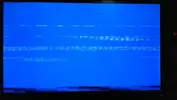
Così, per non formattare e per provarne un'altra, ho effettuato un ripristino del sistema e sembrava tutto risolto...però noto che a volte aprendo Starcraft 2 (che è il gioco che uso attualmente, non escludo che lo farebbe anche con altri) o comunque mentre ci gioco, appare di nuovo una blue screen (che poi quella di w8 è celeste, ma fa lo stesso) tutta sfatta, in cui le scritte sono come...sbavate, non si legge nulla... non so come descriverlo.
Adesso ho deciso di passare all'artiglieria pesante: voglio resettare, però mi chiedevo se, avendo due unità di memoria (un SSD in cui è installato il sistema, driver e poche altre cose e un HDD in cui ho quasi tutto), potessi resettare solo l'SSD, così da mantenere la maggior parte dei file intatta.
Voi che dite? Posso farlo o incorro in spiacevoli incovenienti?

P.S.: Se può servire, ecco la mia configuazione:
Monitor: Asus MX239H 1920*1080
Alimentatore: Antec HCG-620m
Case: NZXT Phantom 410 black/orange + Ventola Aerocool Shark 140mm led arancione
Dissipatore: Thermalright Silver Arrow SB-E Extreme
HDD: Hard Disk Interno Seagate Barracuda 7200.14 1TB 3.5" 64MB SATA3
SSD: Samsung 840 Pro 128GB
Masterizzatore: Samsung SH-224BB 24x DVD/CD SATA Nero bulk
RAM: g.skill Ares 1600Mhz 2*4GB
CPU: intel i7 4770k
Scheda madre: MSI Z87 GD65 Gaming
Scheda video: Radeon hd 7970Ghz Sapphire PowerTune with Dynamic Boost
S.O.: Windows 8
 
Ultima modifica:
ovvio che si devi cmq installare nuovamente i programmi che hanno chiavi di registro per poter funzionare
 
ovvio che si devi cmq installare nuovamente i programmi che hanno chiavi di registro per poter funzionare

Ah bè, almeno sono già tutti sull'HDD e non devo sbattermi più di tanto...immagino che non si possa avere tutto dalla vita :asd: .
Ti ringrazio tanto per aver risposto e per la tua celerità nel farlo!
 
a meno che non usi portable qualuno funzionerà lo stesso altri non andranno e dovrai installare nuovamente
 
Allora ti aggiorno: ho installato sistema e driver, e sono anche riuscito ad avviare starcraft 2 senza reistallarlo (era sull'HDD) però la blue screen è uscita lo stesso...
Avviatolo una seconda volta non è apparso nulla, però questo mi fa capire che non era un problema di windows in sé...
Altra cosa poi: da installazione applicazioni adesso ci sono solo i programmi dell'SSD e gli ultimi che ho messo sull'HDD, ma SC2 non ho dovuto installarlo nuovamente, non dovrebbe esserci anch'esso, per dirne uno?
 
Allora ti aggiorno: ho installato sistema e driver, e sono anche riuscito ad avviare starcraft 2 senza reistallarlo (era sull'HDD) però la blue screen è uscita lo stesso...
Avviatolo una seconda volta non è apparso nulla, però questo mi fa capire che non era un problema di windows in sé...
Altra cosa poi: da installazione applicazioni adesso ci sono solo i programmi dell'SSD e gli ultimi che ho messo sull'HDD, ma SC2 non ho dovuto installarlo nuovamente, non dovrebbe esserci anch'esso, per dirne uno?

no dato che lo hai fatto girare come portable
 
no dato che lo hai fatto girare come portable

Ma cosa può essere questa bluescreen?? Guarda cosa mi esce:IMAG0031.webp .
Non vorrei formattare anche l'altro HDD, c'è tantissima roba :suicidio:

Ora comunque ho cancellato la cartella di SC2 (non potendolo disinstallare da installazione applicazioni) e l'ho installato nuovamente, ma la schermata esce lo stesso.
 
Per il bsod scarica whocrashed dalla mia firma e posta la lettura del dmp a vederlo così sembra la scheda video che fa artefatti
 
Per il bsod scarica whocrashed dalla mia firma e posta la lettura del dmp a vederlo così sembra la scheda video che fa artefatti

Devo leggerti le conclusioni? Dice che il problema è nei driver della mia scheda di rete...quella inclusa nella scheda madre (MSI GD65 Z87 Gaming) cioé la Killer e2200 PCI-E Gigabit Ethernet Controller, Qualcomm Atheros, Inc.
Però oggi con il reset avevo tolto anche quei driver e poi li ho aggiornati all'ultima versione... Poi il programma mi dice anche che il messaggio di errore della blue screen è: DRIVER_IRQL_NOT_LESS_OR_EQUAL
 
Devo leggerti le conclusioni? Dice che il problema è nei driver della mia scheda di rete...quella inclusa nella scheda madre (MSI GD65 Z87 Gaming) cioé la Killer e2200 PCI-E Gigabit Ethernet Controller, Qualcomm Atheros, Inc.
Però oggi con il reset avevo tolto anche quei driver e poi li ho aggiornati all'ultima versione... Poi il programma mi dice anche che il messaggio di errore della blue screen è: DRIVER_IRQL_NOT_LESS_OR_EQUAL

Incolla tutto qui che vediamo meglio magari è la RAM...

Sent from my Nexus 7
 
Incolla tutto qui che vediamo meglio magari è la RAM...

Sent from my Nexus 7

[FONT=Segoe UI, Arial]Crash Dump Analysis
[/FONT]
[FONT=Segoe UI, Arial]Crash dump directory: C:\Windows\Minidump[/FONT]

[FONT=Segoe UI, Arial]Crash dumps are enabled on your computer.
[/FONT]
[FONT=Segoe UI, Arial]On Wed 21/08/2013 21.18.42 GMT your computer crashed
crash dump file: C:\Windows\memory.dmp
This was probably caused by the following module: [FONT=Segoe UI, Arial]Unknown[/FONT] (0xFFFFF88009D32000)
Bugcheck code: 0xD1 (0xFFFFF88009D32000, 0x2, 0x0, 0xFFFFF88004363353)
Error: [FONT=Segoe UI, Arial]DRIVER_IRQL_NOT_LESS_OR_EQUAL[/FONT]
Bug check description: This indicates that a kernel-mode driver attempted to access pageable memory at a process IRQL that was too high.
This appears to be a typical software driver bug and is not likely to be caused by a hardware problem.
A third party driver was identified as the probable root cause of this system error.
Google query: [FONT=Segoe UI, Arial]DRIVER_IRQL_NOT_LESS_OR_EQUAL[/FONT]


[/FONT]
[FONT=Segoe UI, Arial]On Wed 21/08/2013 20.40.19 GMT your computer crashed
crash dump file: C:\Windows\Minidump\082113-6843-01.dmp
This was probably caused by the following module: [FONT=Segoe UI, Arial]e22w8x64.sys[/FONT] (0xFFFFF880059E3353)
Bugcheck code: 0xD1 (0xFFFFF880039C1000, 0x2, 0x0, 0xFFFFF880059E3353)
Error: [FONT=Segoe UI, Arial]DRIVER_IRQL_NOT_LESS_OR_EQUAL[/FONT]
file path: C:\Windows\system32\drivers\e22w8x64.sys
product: [FONT=Segoe UI, Arial]Killer e2200 PCI-E Gigabit Ethernet Controller[/FONT]
company: [FONT=Segoe UI, Arial]Qualcomm Atheros, Inc.[/FONT]
description: Killer e2200 PCI-E Gigabit Ethernet Controller
Bug check description: This indicates that a kernel-mode driver attempted to access pageable memory at a process IRQL that was too high.
This appears to be a typical software driver bug and is not likely to be caused by a hardware problem.
A third party driver was identified as the probable root cause of this system error. It is suggested you look for an update for the following driver: e22w8x64.sys (Killer e2200 PCI-E Gigabit Ethernet Controller, Qualcomm Atheros, Inc.).
Google query: [FONT=Segoe UI, Arial]Qualcomm Atheros, Inc. DRIVER_IRQL_NOT_LESS_OR_EQUAL[/FONT]


[/FONT]
[FONT=Segoe UI, Arial]On Wed 21/08/2013 20.32.57 GMT your computer crashed
crash dump file: C:\Windows\Minidump\082113-6890-01.dmp
This was probably caused by the following module: [FONT=Segoe UI, Arial]e22w8x64.sys[/FONT] (0xFFFFF88004C97353)
Bugcheck code: 0xD1 (0xFFFFF8800BAEA000, 0x2, 0x0, 0xFFFFF88004C97353)
Error: [FONT=Segoe UI, Arial]DRIVER_IRQL_NOT_LESS_OR_EQUAL[/FONT]
file path: C:\Windows\system32\drivers\e22w8x64.sys
product: [FONT=Segoe UI, Arial]Killer e2200 PCI-E Gigabit Ethernet Controller[/FONT]
company: [FONT=Segoe UI, Arial]Qualcomm Atheros, Inc.[/FONT]
description: Killer e2200 PCI-E Gigabit Ethernet Controller
Bug check description: This indicates that a kernel-mode driver attempted to access pageable memory at a process IRQL that was too high.
This appears to be a typical software driver bug and is not likely to be caused by a hardware problem.
A third party driver was identified as the probable root cause of this system error. It is suggested you look for an update for the following driver: e22w8x64.sys (Killer e2200 PCI-E Gigabit Ethernet Controller, Qualcomm Atheros, Inc.).
Google query: [FONT=Segoe UI, Arial]Qualcomm Atheros, Inc. DRIVER_IRQL_NOT_LESS_OR_EQUAL[/FONT]


[/FONT]
[FONT=Segoe UI, Arial]On Wed 21/08/2013 19.51.43 GMT your computer crashed
crash dump file: C:\Windows\Minidump\082113-6828-01.dmp
This was probably caused by the following module: [FONT=Segoe UI, Arial]e22w8x64.sys[/FONT] (0xFFFFF880046AD353)
Bugcheck code: 0xD1 (0xFFFFF8800ADF9000, 0x2, 0x0, 0xFFFFF880046AD353)
Error: [FONT=Segoe UI, Arial]DRIVER_IRQL_NOT_LESS_OR_EQUAL[/FONT]
file path: C:\Windows\system32\drivers\e22w8x64.sys
product: [FONT=Segoe UI, Arial]Killer e2200 PCI-E Gigabit Ethernet Controller[/FONT]
company: [FONT=Segoe UI, Arial]Qualcomm Atheros, Inc.[/FONT]
description: Killer e2200 PCI-E Gigabit Ethernet Controller
Bug check description: This indicates that a kernel-mode driver attempted to access pageable memory at a process IRQL that was too high.
This appears to be a typical software driver bug and is not likely to be caused by a hardware problem.
A third party driver was identified as the probable root cause of this system error. It is suggested you look for an update for the following driver: e22w8x64.sys (Killer e2200 PCI-E Gigabit Ethernet Controller, Qualcomm Atheros, Inc.).
Google query: [FONT=Segoe UI, Arial]Qualcomm Atheros, Inc. DRIVER_IRQL_NOT_LESS_OR_EQUAL[/FONT]


[/FONT]
[FONT=Segoe UI, Arial]On Wed 21/08/2013 17.33.57 GMT your computer crashed
crash dump file: C:\Windows\Minidump\082113-6812-01.dmp
This was probably caused by the following module: [FONT=Segoe UI, Arial]e22w8x64.sys[/FONT] (0xFFFFF8800517B353)
Bugcheck code: 0xD1 (0xFFFFF8800B56E000, 0x2, 0x0, 0xFFFFF8800517B353)
Error: [FONT=Segoe UI, Arial]DRIVER_IRQL_NOT_LESS_OR_EQUAL[/FONT]
file path: C:\Windows\system32\drivers\e22w8x64.sys
product: [FONT=Segoe UI, Arial]Killer e2200 PCI-E Gigabit Ethernet Controller[/FONT]
company: [FONT=Segoe UI, Arial]Qualcomm Atheros, Inc.[/FONT]
description: Killer e2200 PCI-E Gigabit Ethernet Controller
Bug check description: This indicates that a kernel-mode driver attempted to access pageable memory at a process IRQL that was too high.
This appears to be a typical software driver bug and is not likely to be caused by a hardware problem.
A third party driver was identified as the probable root cause of this system error. It is suggested you look for an update for the following driver: e22w8x64.sys (Killer e2200 PCI-E Gigabit Ethernet Controller, Qualcomm Atheros, Inc.).
Google query: [FONT=Segoe UI, Arial]Qualcomm Atheros, Inc. DRIVER_IRQL_NOT_LESS_OR_EQUAL[/FONT]


[/FONT]
[FONT=Segoe UI, Arial]
Conclusion

[/FONT]
[FONT=Segoe UI, Arial]5 crash dumps have been found and analyzed. A third party driver has been identified to be causing system crashes on your computer. It is strongly suggested that you check for updates for these drivers on their company websites. Click on the links below to search with Google for updates for these drivers:

[FONT=Segoe UI, Arial]e22w8x64.sys (Killer e2200 PCI-E Gigabit Ethernet Controller, Qualcomm Atheros, Inc.)[/FONT]

If no updates for these drivers are available, try searching with Google on the names of these drivers in combination the errors that have been reported for these drivers and include the brand and model name of your computer as well in the query. This often yields interesting results from discussions from users who have been experiencing similar problems.


Read the topic general suggestions for troubleshooting system crashes for more information.

Note that it's not always possible to state with certainty whether a reported driver is actually responsible for crashing your system or that the root cause is in another module. Nonetheless it's suggested you look for updates for the products that these drivers belong to and regularly visit Windows update or enable automatic updates for Windows. In case a piece of malfunctioning hardware is causing trouble, a search with Google on the bug check errors together with the model name and brand of your computer may help you investigate this further.
[/FONT]
 
e già sembra la scheda di rete forse è danneggiata o forse i driver sono buggati... ma se con l'aggiornamento funzionano correttamente lascia così
 
Ho trovato questo: MSI USA

Per ora non ho fatto così, ho semplicemente messo i precedenti driver (perché era con gli ultimi che evidentemente il problema è peggiorato) e fin'ora non crasha. Ed ora che ci penso, inizialmente avevo disabilitato questo servizio ed andava tutto bene. Può darsi che i loro driver non vadano ancora bene. Che dici?

P.S.: So che magari non centra nulla, ma perché quella BSOD mi usciva così sfatta??? :boh:
 
Ultima modifica:
Pubblicità
Pubblicità
Indietro
Top