Hurridge
Utente Attivo
- Messaggi
- 155
- Reazioni
- 12
- Punteggio
- 44
Dopo aver risolto due BSOD credo che i file di Win7 siano danneggiati. Ieri sera mentre giocavo ho cercato di aprire Google Chrome e dopo una decina di secondi di freeze ho ottenuto l'ennesima schermata blu, ecco il codice di errore:
Quindi cerco su internet e trovo una discussione su Tom's Hardware che descriveva il mio stesso problema "http://www.tomshw.it/forum/windows/209342-schermata-blu-ntfs-sys-help-per-favore.html" ed eseguo questo comando sul cmd Chkdsk /f /r riavvio il pc e lo lascio acceso durante la notte a completare tutte le operazioni. Adesso sto utilizzando HDTune per una Error Scan, mentre ho già completato un Bechmark ma non ci ho capito molto
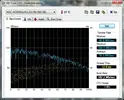 Avreste altri suggerimenti per essere sicuro di aver risolto il problema ?
- - - Updated - - -
Altro BSOD sta volta con un altro errore
:cry:
- - - Updated - - -
Ho avuto un altro crash sta volta senza BSOD, infatti non sono riuscito a risalire all'errore tramite il programma WhoCrashed. Volevo aggiungere che le mie Ram CMZ8GX3M2A1600C9 hanno una frequenza di 1600MHz e dato che il mio processore Intel Core i5 760 non è in grado di settarle, tramite il bios ho impostato manualmente la frequenza più alta che potesse sostenere e cioè 1333MHz
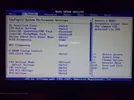 Dato che non sono un esperto magari ho dimenticato qualche altro settaggio da impostare e che magari è la causa di tutti questi problemi... :help:
Crash dump directory: C:\Windows\Minidump
Crash dumps are enabled on your computer.
On Sun 17/11/2013 23:50:25 GMT your computer crashed
crash dump file: C:\Windows\Minidump\111813-15834-01.dmp
This was probably caused by the following module: ntfs.sys (Ntfs+0xF57E0)
Bugcheck code: 0x7A (0xFFFFF6FC400099A0, 0xFFFFFFFFC000000E, 0x20449F860, 0xFFFFF880013347E0)
Error: KERNEL_DATA_INPAGE_ERROR
file path: C:\Windows\system32\drivers\ntfs.sys
product: Sistema operativo Microsoft® Windows®
company: Microsoft Corporation
description: Driver file system NT
Bug check description: This bug check indicates that the requested page of kernel data from the paging file could not be read into memory.
The crash took place in a standard Microsoft module. Your system configuration may be incorrect. Possibly this problem is caused by another driver on your system that cannot be identified at this time.
On Sun 17/11/2013 23:50:25 GMT your computer crashed
crash dump file: C:\Windows\memory.dmp
This was probably caused by the following module: ntfs.sys (Ntfs+0xF57E0)
Bugcheck code: 0x7A (0xFFFFF6FC400099A0, 0xFFFFFFFFC000000E, 0x20449F860, 0xFFFFF880013347E0)
Error: KERNEL_DATA_INPAGE_ERROR
file path: C:\Windows\system32\drivers\ntfs.sys
product: Sistema operativo Microsoft® Windows®
company: Microsoft Corporation
description: Driver file system NT
Bug check description: This bug check indicates that the requested page of kernel data from the paging file could not be read into memory.
The crash took place in a standard Microsoft module. Your system configuration may be incorrect. Possibly this problem is caused by another driver on your system that cannot be identified at this time.
Crash dumps are enabled on your computer.
On Sun 17/11/2013 23:50:25 GMT your computer crashed
crash dump file: C:\Windows\Minidump\111813-15834-01.dmp
This was probably caused by the following module: ntfs.sys (Ntfs+0xF57E0)
Bugcheck code: 0x7A (0xFFFFF6FC400099A0, 0xFFFFFFFFC000000E, 0x20449F860, 0xFFFFF880013347E0)
Error: KERNEL_DATA_INPAGE_ERROR
file path: C:\Windows\system32\drivers\ntfs.sys
product: Sistema operativo Microsoft® Windows®
company: Microsoft Corporation
description: Driver file system NT
Bug check description: This bug check indicates that the requested page of kernel data from the paging file could not be read into memory.
The crash took place in a standard Microsoft module. Your system configuration may be incorrect. Possibly this problem is caused by another driver on your system that cannot be identified at this time.
On Sun 17/11/2013 23:50:25 GMT your computer crashed
crash dump file: C:\Windows\memory.dmp
This was probably caused by the following module: ntfs.sys (Ntfs+0xF57E0)
Bugcheck code: 0x7A (0xFFFFF6FC400099A0, 0xFFFFFFFFC000000E, 0x20449F860, 0xFFFFF880013347E0)
Error: KERNEL_DATA_INPAGE_ERROR
file path: C:\Windows\system32\drivers\ntfs.sys
product: Sistema operativo Microsoft® Windows®
company: Microsoft Corporation
description: Driver file system NT
Bug check description: This bug check indicates that the requested page of kernel data from the paging file could not be read into memory.
The crash took place in a standard Microsoft module. Your system configuration may be incorrect. Possibly this problem is caused by another driver on your system that cannot be identified at this time.
- - - Updated - - -
Altro BSOD sta volta con un altro errore
[FONT=Segoe UI, Arial]Crash dump directory: C:\Windows\Minidump[/FONT]
[FONT=Segoe UI, Arial][/FONT]
[FONT=Segoe UI, Arial]Crash dumps are enabled on your computer.
[/FONT]
[FONT=Segoe UI, Arial]On Mon 18/11/2013 10:49:18 GMT your computer crashed
crash dump file: C:\Windows\Minidump\111813-15194-01.dmp
This was probably caused by the following module: [FONT=Segoe UI, Arial]xntkrnl.exe[/FONT] (nt+0x71F00)
Bugcheck code: 0xF4 (0x3, 0xFFFFFA8007C52060, 0xFFFFFA8007C52340, 0xFFFFF800031C9240)
Error: [FONT=Segoe UI, Arial]CRITICAL_OBJECT_TERMINATION[/FONT]
file path: C:\Windows\system32\xntkrnl.exe
product: [FONT=Segoe UI, Arial]Microsoft® Windows® Operating System[/FONT]
company: [FONT=Segoe UI, Arial]Microsoft Corporation[/FONT]
description: NT Kernel & System
Bug check description: This indicates that a process or thread crucial to system operation has unexpectedly exited or been terminated.
This appears to be a typical software driver bug and is not likely to be caused by a hardware problem.
The crash took place in a standard Microsoft module. Your system configuration may be incorrect. Possibly this problem is caused by another driver on your system that cannot be identified at this time.
[/FONT]
[FONT=Segoe UI, Arial]On Mon 18/11/2013 10:49:18 GMT your computer crashed
crash dump file: C:\Windows\memory.dmp
This was probably caused by the following module: [FONT=Segoe UI, Arial]ntkrnlmp.exe[/FONT] (nt!KeBugCheckEx+0x0)
Bugcheck code: 0xF4 (0x3, 0xFFFFFA8007C52060, 0xFFFFFA8007C52340, 0xFFFFF800031C9240)
Error: [FONT=Segoe UI, Arial]CRITICAL_OBJECT_TERMINATION[/FONT]
Bug check description: This indicates that a process or thread crucial to system operation has unexpectedly exited or been terminated.
This appears to be a typical software driver bug and is not likely to be caused by a hardware problem.
The crash took place in the Windows kernel. Possibly this problem is caused by another driver that cannot be identified at this time. [/FONT]
[FONT=Segoe UI, Arial][/FONT]
[FONT=Segoe UI, Arial]Crash dumps are enabled on your computer.
[/FONT]
[FONT=Segoe UI, Arial]On Mon 18/11/2013 10:49:18 GMT your computer crashed
crash dump file: C:\Windows\Minidump\111813-15194-01.dmp
This was probably caused by the following module: [FONT=Segoe UI, Arial]xntkrnl.exe[/FONT] (nt+0x71F00)
Bugcheck code: 0xF4 (0x3, 0xFFFFFA8007C52060, 0xFFFFFA8007C52340, 0xFFFFF800031C9240)
Error: [FONT=Segoe UI, Arial]CRITICAL_OBJECT_TERMINATION[/FONT]
file path: C:\Windows\system32\xntkrnl.exe
product: [FONT=Segoe UI, Arial]Microsoft® Windows® Operating System[/FONT]
company: [FONT=Segoe UI, Arial]Microsoft Corporation[/FONT]
description: NT Kernel & System
Bug check description: This indicates that a process or thread crucial to system operation has unexpectedly exited or been terminated.
This appears to be a typical software driver bug and is not likely to be caused by a hardware problem.
The crash took place in a standard Microsoft module. Your system configuration may be incorrect. Possibly this problem is caused by another driver on your system that cannot be identified at this time.
[/FONT]
[FONT=Segoe UI, Arial]On Mon 18/11/2013 10:49:18 GMT your computer crashed
crash dump file: C:\Windows\memory.dmp
This was probably caused by the following module: [FONT=Segoe UI, Arial]ntkrnlmp.exe[/FONT] (nt!KeBugCheckEx+0x0)
Bugcheck code: 0xF4 (0x3, 0xFFFFFA8007C52060, 0xFFFFFA8007C52340, 0xFFFFF800031C9240)
Error: [FONT=Segoe UI, Arial]CRITICAL_OBJECT_TERMINATION[/FONT]
Bug check description: This indicates that a process or thread crucial to system operation has unexpectedly exited or been terminated.
This appears to be a typical software driver bug and is not likely to be caused by a hardware problem.
The crash took place in the Windows kernel. Possibly this problem is caused by another driver that cannot be identified at this time. [/FONT]
- - - Updated - - -
Ho avuto un altro crash sta volta senza BSOD, infatti non sono riuscito a risalire all'errore tramite il programma WhoCrashed. Volevo aggiungere che le mie Ram CMZ8GX3M2A1600C9 hanno una frequenza di 1600MHz e dato che il mio processore Intel Core i5 760 non è in grado di settarle, tramite il bios ho impostato manualmente la frequenza più alta che potesse sostenere e cioè 1333MHz