PROBLEMA Blue screen all'avvio

Pubblicità

Francesco Attanasio

Nuovo Utente
Messaggi
60
Reazioni
0
Punteggio
25
Buon giorno a tutti.

Quando ho acceso il pc stamane mi è apparsa una schermata blu per qualche secondo, poi si è riavviato da solo e mi diceva di scegliere tra "avvia windows normalmente" o "avvia strumento di ripristino al prossimo avvio" e ho scelto la prima opzione.

Sul desktop mi è apparso questo messaggio sulle info dell'errore:
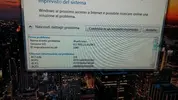
13120563_10209356371049273_626669730_o.webp13106800_10209356370809267_1095221560_o.webp

il pc l'ho fatto assemblare in un negozio di informatica un mese e mezzo fa.

grazie
 
Buon giorno a tutti.

Quando ho acceso il pc stamane mi è apparsa una schermata blu per qualche secondo, poi si è riavviato da solo e mi diceva di scegliere tra "avvia windows normalmente" o "avvia strumento di ripristino al prossimo avvio" e ho scelto la prima opzione.

Sul desktop mi è apparso questo messaggio sulle info dell'errore:
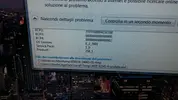
Visualizza allegato 203646Visualizza allegato 203647

il pc l'ho fatto assemblare in un negozio di informatica un mese e mezzo fa.

grazie

ciao scarica whocrashed e posta la lettura del dmp grazie
 
la butto li senza vedere la blue screen o il log di whocrashed ma credo sia un problema di drivers...magari sbaglio però
 
dal report fai copia e incolla che facciamo prima grazie

[FONT=Segoe UI, Arial]System Information (local)
[/FONT]
[FONT=Segoe UI, Arial]Computer name: UTENTE-PC
Windows version: Windows 7 Service Pack 1, 6.1, build: 7601
Windows dir: C:\Windows
Hardware: MS-7996, MSI, H110M PRO-VD (MS-7996)
CPU: GenuineIntel Intel(R) Core(TM) i3-6100 CPU @ 3.70GHz Intel586, level: 6
4 logical processors, active mask: 15
RAM: 8471236608 bytes total


[/FONT][FONT=Segoe UI, Arial]Crash Dump Analysis
[/FONT]
[FONT=Segoe UI, Arial]Crash dump directory: C:\Windows\Minidump[/FONT]
[FONT=Segoe UI, Arial][/FONT]
[FONT=Segoe UI, Arial]Crash dumps are enabled on your computer.
[/FONT]
[FONT=Segoe UI, Arial]On Sun 01/05/2016 09:38:20 GMT your computer crashed
crash dump file: C:\Windows\Minidump\050116-24663-01.dmp
This was probably caused by the following module: [FONT=Segoe UI, Arial]igdkmd64.sys[/FONT] (igdkmd64+0x121B0)
Bugcheck code: 0x116 (0xFFFFFA80093EE010, 0xFFFFF88004E3E1B0, 0x0, 0x2)
Error: [FONT=Segoe UI, Arial]VIDEO_TDR_ERROR[/FONT]
file path: C:\Windows\system32\drivers\igdkmd64.sys
product: [FONT=Segoe UI, Arial]Intel HD Graphics Drivers for Windows(R)[/FONT]
company: [FONT=Segoe UI, Arial]Intel Corporation[/FONT]
description: Intel Graphics Kernel Mode Driver
Bug check description: This indicates that an attempt to reset the display driver and recover from a timeout failed.
A third party driver was identified as the probable root cause of this system error. It is suggested you look for an update for the following driver: igdkmd64.sys (Intel Graphics Kernel Mode Driver, Intel Corporation).
Google query: [FONT=Segoe UI, Arial]Intel Corporation VIDEO_TDR_ERROR

[/FONT]
[/FONT][FONT=Segoe UI, Arial]Conclusion
[/FONT]
[FONT=Segoe UI, Arial]4 crash dumps have been found and analyzed. A third party driver has been identified to be causing system crashes on your computer. It is strongly suggested that you check for updates for these drivers on their company websites. Click on the links below to search with Google for updates for these drivers:

[FONT=Segoe UI, Arial]igdkmd64.sys (Intel Graphics Kernel Mode Driver, Intel Corporation)[/FONT]

If no updates for these drivers are available, try searching with Google on the names of these drivers in combination with the errors that have been reported for these drivers. Include the brand and model name of your computer as well in the query. This often yields interesting results from discussions on the web by users who have been experiencing similar problems.
[/FONT][FONT=Segoe UI, Arial]
[/FONT]
 
come vedi ti indica il driver grafico....ti tocca aggiornarlo e riprovare
 
come vedi ti indica il driver grafico....ti tocca aggiornarlo e riprovare

andando in computer ----> gestione periferiche ---> scheda grafica ----> aggiorna driver mi dice che l'ultima versione dei driver è già istallata.

Andando però sul sito Intel ho trovato una versione di marzo 2016 (mentre i driver che ho istallato sono di febbraio 2016)

https://downloadcenter.intel.com/it...-530-for-6th-Generation-Intel-Core-Processors

il secondo, quello dell' 8/3/2016. faccio bene? perchè il primo è una versione BETA anche se un po più recente
 
andando in computer ----> gestione periferiche ---> scheda grafica ----> aggiorna driver mi dice che l'ultima versione dei driver è già istallata.

Andando però sul sito Intel ho trovato una versione di marzo 2016 (mentre i driver che ho istallato sono di febbraio 2016)

https://downloadcenter.intel.com/it...-530-for-6th-Generation-Intel-Core-Processors

il secondo, quello dell' 8/3/2016. faccio bene? perchè il primo è una versione BETA anche se un po più recente

con ddu rimuovi il driver e installa l'ultimo rilasciato
 
esatto come suggeritoti elimina i drivers con ddu e metti l'ultima versione stabile
 
Pubblicità
Pubblicità
Indietro
Top