U
Utente 391501
Ospite
Ciao a tutti,
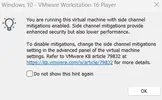
Ogni volta che uso macchine virtuali su VMware mi compare l'avviso "You are running this virtual machine with side channel migration enabled. Side channel migration provide enhanched security but also lower performance". Come visibile nella foto.
E noto anche, come l'avviso dice, che le VM spesso sono lente anche se gli do 4 cpu e 8gb di ram.
Come faccio a risolvere?
(Ho anche provato come dicevano in qualche guida su internet ad abilitare l'Hyper-V dalle funzionalità di Windows)
Uso Windows 11 su un pc assemblato.
Ogni volta che uso macchine virtuali su VMware mi compare l'avviso "You are running this virtual machine with side channel migration enabled. Side channel migration provide enhanched security but also lower performance". Come visibile nella foto.
E noto anche, come l'avviso dice, che le VM spesso sono lente anche se gli do 4 cpu e 8gb di ram.
Come faccio a risolvere?
(Ho anche provato come dicevano in qualche guida su internet ad abilitare l'Hyper-V dalle funzionalità di Windows)
Uso Windows 11 su un pc assemblato.