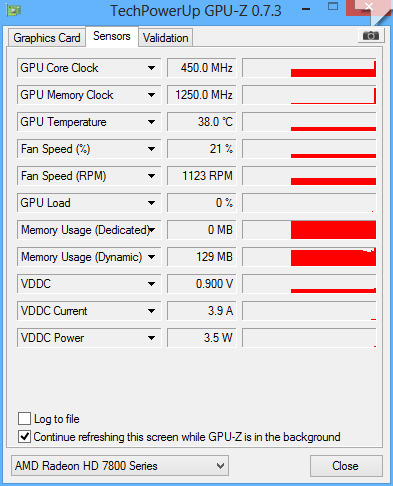
allora, l'altro giorno ho avuto la bellissima idea di formattare il pc cosi per provare ho deciso di istallare Windows 8 invece che 7
ora pero ogni tanto mi appaiono 2 schermate di errore, Clock_Watchdog_Timeout e System_Service_Exception
ho fatto un test con whocrashed, siccome è la prima volta che lo utilizzo, non ho idea di come funzioni, posto qui il risultato sperando che qualcuno mi possa aiutare
ora pero ogni tanto mi appaiono 2 schermate di errore, Clock_Watchdog_Timeout e System_Service_Exception
ho fatto un test con whocrashed, siccome è la prima volta che lo utilizzo, non ho idea di come funzioni, posto qui il risultato sperando che qualcuno mi possa aiutare
[FONT=Segoe UI, Arial]System Information (local)
[/FONT]
[FONT=Segoe UI, Arial]computer name: PC-CARMINE
windows version: Windows 8 , 6.2, build: 9200
windows dir: C:\Windows
CPU: AuthenticAMD AMD FX(tm)-6300 Six-Core Processor AMD586, level: 21
6 logical processors, active mask: 63
RAM: 8570261504 total
VM: 2147352576, free: 1930645504
[/FONT]
[FONT=Segoe UI, Arial]
Crash Dump Analysis
[/FONT]
[FONT=Segoe UI, Arial]Crash dump directory: C:\Windows\Minidump[/FONT]
[FONT=Segoe UI, Arial]Crash dumps are enabled on your computer.
[/FONT]
[FONT=Segoe UI, Arial]On Sat 14/09/2013 19.50.28 GMT your computer crashed
crash dump file: C:\Windows\memory.dmp
This was probably caused by the following module: [FONT=Segoe UI, Arial]Unknown[/FONT] (0xFFFFF88002C67180)
Bugcheck code: 0x101 (0x21, 0x0, 0xFFFFF88002C67180, 0x2)
Error: [FONT=Segoe UI, Arial]CLOCK_WATCHDOG_TIMEOUT[/FONT]
Bug check description: This indicates that an expected clock interrupt on a secondary processor, in a multi-processor system, was not received within the allocated interval.
This appears to be a typical software driver bug and is not likely to be caused by a hardware problem. This problem might be caused by a thermal issue.
A third party driver was identified as the probable root cause of this system error.
Google query: [FONT=Segoe UI, Arial]CLOCK_WATCHDOG_TIMEOUT[/FONT]
[/FONT]
[FONT=Segoe UI, Arial]On Sat 14/09/2013 18.48.22 GMT your computer crashed
crash dump file: C:\Windows\Minidump\091413-14492-01.dmp
This was probably caused by the following module: [FONT=Segoe UI, Arial]dxgmms1.sys[/FONT] (0xFFFFF88007806FB3)
Bugcheck code: 0x3D (0xFFFFF88002B7A960, 0x0, 0x0, 0xFFFFF88007806FB3)
Error: [FONT=Segoe UI, Arial]INTERRUPT_EXCEPTION_NOT_HANDLED[/FONT]
file path: C:\Windows\system32\drivers\dxgmms1.sys
product: [FONT=Segoe UI, Arial]Microsoft® Windows® Operating System[/FONT]
company: [FONT=Segoe UI, Arial]Microsoft Corporation[/FONT]
description: DirectX Graphics MMS
Bug check description: This bug check appears very infrequently.
The crash took place in a standard Microsoft module. Your system configuration may be incorrect. Possibly this problem is caused by another driver on your system that cannot be identified at this time.
[/FONT]
[FONT=Segoe UI, Arial]On Sat 14/09/2013 14.40.45 GMT your computer crashed
crash dump file: C:\Windows\Minidump\091413-27986-01.dmp
This was probably caused by the following module: [FONT=Segoe UI, Arial]ntoskrnl.exe[/FONT] (nt+0x5A440)
Bugcheck code: 0x3B (0xC0000005, 0xFFFFF8004333D172, 0xFFFFF88002DFEF90, 0x0)
Error: [FONT=Segoe UI, Arial]SYSTEM_SERVICE_EXCEPTION[/FONT]
file path: C:\Windows\system32\ntoskrnl.exe
product: [FONT=Segoe UI, Arial]Microsoft® Windows® Operating System[/FONT]
company: [FONT=Segoe UI, Arial]Microsoft Corporation[/FONT]
description: NT Kernel & System
Bug check description: This indicates that an exception happened while executing a routine that transitions from non-privileged code to privileged code.
This appears to be a typical software driver bug and is not likely to be caused by a hardware problem.
The crash took place in the Windows kernel. Possibly this problem is caused by another driver that cannot be identified at this time.
[/FONT]
[FONT=Segoe UI, Arial]On Sat 14/09/2013 13.03.51 GMT your computer crashed
crash dump file: C:\Windows\Minidump\091413-11887-01.dmp
This was probably caused by the following module: [FONT=Segoe UI, Arial]ntoskrnl.exe[/FONT] (nt+0x7B040)
Bugcheck code: 0x3B (0xC0000005, 0xFFFFF801F04E2D02, 0xFFFFF8800D9568C0, 0x0)
Error: [FONT=Segoe UI, Arial]SYSTEM_SERVICE_EXCEPTION[/FONT]
file path: C:\Windows\system32\ntoskrnl.exe
product: [FONT=Segoe UI, Arial]Microsoft® Windows® Operating System[/FONT]
company: [FONT=Segoe UI, Arial]Microsoft Corporation[/FONT]
description: NT Kernel & System
Bug check description: This indicates that an exception happened while executing a routine that transitions from non-privileged code to privileged code.
This appears to be a typical software driver bug and is not likely to be caused by a hardware problem.
The crash took place in the Windows kernel. Possibly this problem is caused by another driver that cannot be identified at this time.
[/FONT]
[FONT=Segoe UI, Arial]
Conclusion
[/FONT]
[FONT=Segoe UI, Arial]4 crash dumps have been found and analyzed.
Read the topic general suggestions for troubleshooting system crashes for more information.
Note that it's not always possible to state with certainty whether a reported driver is actually responsible for crashing your system or that the root cause is in another module. Nonetheless it's suggested you look for updates for the products that these drivers belong to and regularly visit Windows update or enable automatic updates for Windows. In case a piece of malfunctioning hardware is causing trouble, a search with Google on the bug check errors together with the model name and brand of your computer may help you investigate this further.
[/FONT]
[/FONT]
[FONT=Segoe UI, Arial]computer name: PC-CARMINE
windows version: Windows 8 , 6.2, build: 9200
windows dir: C:\Windows
CPU: AuthenticAMD AMD FX(tm)-6300 Six-Core Processor AMD586, level: 21
6 logical processors, active mask: 63
RAM: 8570261504 total
VM: 2147352576, free: 1930645504
[/FONT]
[FONT=Segoe UI, Arial]
Crash Dump Analysis
[/FONT]
[FONT=Segoe UI, Arial]Crash dump directory: C:\Windows\Minidump[/FONT]
[FONT=Segoe UI, Arial]Crash dumps are enabled on your computer.
[/FONT]
[FONT=Segoe UI, Arial]On Sat 14/09/2013 19.50.28 GMT your computer crashed
crash dump file: C:\Windows\memory.dmp
This was probably caused by the following module: [FONT=Segoe UI, Arial]Unknown[/FONT] (0xFFFFF88002C67180)
Bugcheck code: 0x101 (0x21, 0x0, 0xFFFFF88002C67180, 0x2)
Error: [FONT=Segoe UI, Arial]CLOCK_WATCHDOG_TIMEOUT[/FONT]
Bug check description: This indicates that an expected clock interrupt on a secondary processor, in a multi-processor system, was not received within the allocated interval.
This appears to be a typical software driver bug and is not likely to be caused by a hardware problem. This problem might be caused by a thermal issue.
A third party driver was identified as the probable root cause of this system error.
Google query: [FONT=Segoe UI, Arial]CLOCK_WATCHDOG_TIMEOUT[/FONT]
[/FONT]
[FONT=Segoe UI, Arial]On Sat 14/09/2013 18.48.22 GMT your computer crashed
crash dump file: C:\Windows\Minidump\091413-14492-01.dmp
This was probably caused by the following module: [FONT=Segoe UI, Arial]dxgmms1.sys[/FONT] (0xFFFFF88007806FB3)
Bugcheck code: 0x3D (0xFFFFF88002B7A960, 0x0, 0x0, 0xFFFFF88007806FB3)
Error: [FONT=Segoe UI, Arial]INTERRUPT_EXCEPTION_NOT_HANDLED[/FONT]
file path: C:\Windows\system32\drivers\dxgmms1.sys
product: [FONT=Segoe UI, Arial]Microsoft® Windows® Operating System[/FONT]
company: [FONT=Segoe UI, Arial]Microsoft Corporation[/FONT]
description: DirectX Graphics MMS
Bug check description: This bug check appears very infrequently.
The crash took place in a standard Microsoft module. Your system configuration may be incorrect. Possibly this problem is caused by another driver on your system that cannot be identified at this time.
[/FONT]
[FONT=Segoe UI, Arial]On Sat 14/09/2013 14.40.45 GMT your computer crashed
crash dump file: C:\Windows\Minidump\091413-27986-01.dmp
This was probably caused by the following module: [FONT=Segoe UI, Arial]ntoskrnl.exe[/FONT] (nt+0x5A440)
Bugcheck code: 0x3B (0xC0000005, 0xFFFFF8004333D172, 0xFFFFF88002DFEF90, 0x0)
Error: [FONT=Segoe UI, Arial]SYSTEM_SERVICE_EXCEPTION[/FONT]
file path: C:\Windows\system32\ntoskrnl.exe
product: [FONT=Segoe UI, Arial]Microsoft® Windows® Operating System[/FONT]
company: [FONT=Segoe UI, Arial]Microsoft Corporation[/FONT]
description: NT Kernel & System
Bug check description: This indicates that an exception happened while executing a routine that transitions from non-privileged code to privileged code.
This appears to be a typical software driver bug and is not likely to be caused by a hardware problem.
The crash took place in the Windows kernel. Possibly this problem is caused by another driver that cannot be identified at this time.
[/FONT]
[FONT=Segoe UI, Arial]On Sat 14/09/2013 13.03.51 GMT your computer crashed
crash dump file: C:\Windows\Minidump\091413-11887-01.dmp
This was probably caused by the following module: [FONT=Segoe UI, Arial]ntoskrnl.exe[/FONT] (nt+0x7B040)
Bugcheck code: 0x3B (0xC0000005, 0xFFFFF801F04E2D02, 0xFFFFF8800D9568C0, 0x0)
Error: [FONT=Segoe UI, Arial]SYSTEM_SERVICE_EXCEPTION[/FONT]
file path: C:\Windows\system32\ntoskrnl.exe
product: [FONT=Segoe UI, Arial]Microsoft® Windows® Operating System[/FONT]
company: [FONT=Segoe UI, Arial]Microsoft Corporation[/FONT]
description: NT Kernel & System
Bug check description: This indicates that an exception happened while executing a routine that transitions from non-privileged code to privileged code.
This appears to be a typical software driver bug and is not likely to be caused by a hardware problem.
The crash took place in the Windows kernel. Possibly this problem is caused by another driver that cannot be identified at this time.
[/FONT]
[FONT=Segoe UI, Arial]
Conclusion
[/FONT]
[FONT=Segoe UI, Arial]4 crash dumps have been found and analyzed.
Read the topic general suggestions for troubleshooting system crashes for more information.
Note that it's not always possible to state with certainty whether a reported driver is actually responsible for crashing your system or that the root cause is in another module. Nonetheless it's suggested you look for updates for the products that these drivers belong to and regularly visit Windows update or enable automatic updates for Windows. In case a piece of malfunctioning hardware is causing trouble, a search with Google on the bug check errors together with the model name and brand of your computer may help you investigate this further.
[/FONT]