PROBLEMA Problema con boot override in più

Pubblicità

davide02

Nuovo Utente
Messaggi
20
Reazioni
0
Punteggio
24
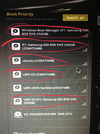
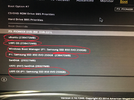
Salve a tutti, sul mio fisso volevo provare ad installare Ubuntu solo che dopo un po’ ho deciso di tornare a Windows. Ho formattato almeno 3 volte l’SSD e reinstallato nella maniera migliore possibile l’SO l’unico problema è che ora mi trovo delle voci ripetute nel BIOS della stessa unità con gli stessi effetti di avvio ma con nomi diversi, come risolvo il problema?
IMG_0314.webpIMG_0315.webp

Inviato da iPhone tramite App ufficiale di Tom\'s Hardware Italia Forum
 
Ultima modifica da un moderatore:
non conosco il bios ma credo sia possibile rimuovere manualmente quelle entry sul boot overraid ... come si chiama la scheda madre?
 
Grazie della risposta, ASUS H97 - PLUS


Inviato da iPhone tramite App ufficiale di Tom\'s Hardware Italia Forum
Key Management
This allows you to manage the Secure Boot keys.
Install Default Secure Boot keys
This item allows you to immediately load the default Security Boot keys, Platform key
(PK), Key-exchange Key (KEK), Signature database (db), and Revoked Signatures
(dbx). When the default Secure boot keys are loaded, all the Secure Boot keys’ state
will change from Unloaded mode to loaded mode.
Clear Secure Boot keys
This item appears only when you load the default Secure Boot keys. This item allows
you to clear all the previously applied Secure Boot keys.
Save Secure Boot Keys
This item allows you to save all the Secure Boot keys to a USB storage device.
PK Management
The Platform Key (PK) locks and secures the firmware from any non-permissible
changes. The system verifies the PK before your system enters the OS.
Delete PK
Allows you to delete the PK from your system. Once the PK is deleted, all the
system’s Secure Boot keys will not be active.
Load Default PK
Select Yes to load the system default PK or select No to load a downloaded PK
from a USB storage device.
 
Key Management
This allows you to manage the Secure Boot keys.
Install Default Secure Boot keys
This item allows you to immediately load the default Security Boot keys, Platform key
(PK), Key-exchange Key (KEK), Signature database (db), and Revoked Signatures
(dbx). When the default Secure boot keys are loaded, all the Secure Boot keys’ state
will change from Unloaded mode to loaded mode.
Clear Secure Boot keys
This item appears only when you load the default Secure Boot keys. This item allows
you to clear all the previously applied Secure Boot keys.
Save Secure Boot Keys
This item allows you to save all the Secure Boot keys to a USB storage device.
PK Management
The Platform Key (PK) locks and secures the firmware from any non-permissible
changes. The system verifies the PK before your system enters the OS.
Delete PK
Allows you to delete the PK from your system. Once the PK is deleted, all the
system’s Secure Boot keys will not be active.
Load Default PK
Select Yes to load the system default PK or select No to load a downloaded PK
from a USB storage device.
Non riesco a capire molto bene cosa fare scusami.
 
Pubblicità
Pubblicità
Indietro
Top