RISOLTO Opinione su monitor

Pubblicità
nessuno dei 2 non sono manco ips.
Ti consiglio vivamente invece msi optix che ha un pannello top, rispetto ai 2 citati da te
 
Tra i due prendi msi optix, nettamente piu completo, qualitativamente è migliore, sia a livello di pannello, sia a livello di feature.
L'aoc rimane un ottimo prodotto, ma è inferiore all'msi
 
Tra i due prendi msi optix, nettamente piu completo, qualitativamente è migliore, sia a livello di pannello, sia a livello di feature.
L'aoc rimane un ottimo prodotto, ma è inferiore all'msi
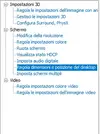
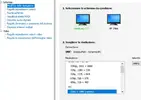
Ciao alla fine come da te consigliato mi sono preso l'msi optix, avevo letto che e un free-sync ma anche compatibile con il g-sync della nvidia. Ho collegato il DP ma sul pannello di controllo Nvidia non si trova la spunta per il g-sync. Puoi aiutarmi? Grazie in anticipo!
 
lo è tramite display port.

If your monitor is one of the G-Sync Compatible models, then G-Sync should automatically enable itself, as should variable refresh rates. If not, you can manually enable G-Sync using the following steps:

  1. Open Nvidia Control Panel
  2. Got to “Display: Set up G-SYNC”
  3. Check “Enable G-SYNC G-SYNC Compatible” and select your preferred options
  4. Select your monitor
  5. Check “Enable settings for the selected display model”
  6. Apply settings
 
lo è tramite display port.

If your monitor is one of the G-Sync Compatible models, then G-Sync should automatically enable itself, as should variable refresh rates. If not, you can manually enable G-Sync using the following steps:

  1. Open Nvidia Control Panel
  2. Got to “Display: Set up G-SYNC”
  3. Check “Enable G-SYNC G-SYNC Compatible” and select your preferred options
  4. Select your monitor
  5. Check “Enable settings for the selected display model”
  6. Apply settings
Guarda ho trovato il problema, avendo una gtx 970 per attivare il g-sync su un monitor non g-sync serve una scheda video dall serie 1000 in su. Comunque grazie mille dell'aiuto!
 
Pubblicità
Pubblicità
Indietro
Top