PROBLEMA Freeze PC

Pubblicità

Marvv

Utente Attivo
Messaggi
153
Reazioni
16
Punteggio
54
Come da titolo poco fa ho avuto un freeze del pc,niente crash,niente schermata blu,semplicemente un freeze totale di monitor(rimasto acceso) con conseguente freeze immagine e impossibilita di usare qualsiasi periferica (tastiera non dave segni di vita ma le luci erano accese cosi come il mouse)
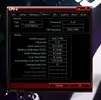
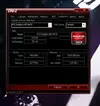
Vi posto le caratteristiche del pc
Cattura.webp
Cattura2.webp
Cattura3.webp
Cattura4.webp

Alimentatore Evga 500b

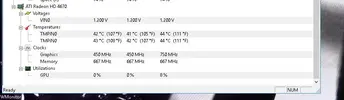
Questo è quanto riporta HWmonitor in idle

Cattura5.webp
Cattura6.webp
Cattura7.webp

Il pc è datato Febbraio di quest'anno,montato personalmente,ultimamente ho aggiornato anche il bios della mobo all'ultimo disponibile.
L'os è installato su un Hd un po vecchiotto riciclato dal mio vecchio pc Questa è la prima volta che si presenta questo problema
Spero di ricevere consigli :D
 
Ultima modifica:
Come da titolo poco fa ho avuto un freeze del pc,niente crash,niente schermata blu,semplicemente un freeze totale di monitor(rimasto acceso) con conseguente freeze immagine e impossibilita di usare qualsiasi periferica (tastiera non dave segni di vita ma le luci erano accese cosi come il mouse)
Vi posto le caratteristiche del pc
Visualizza allegato 210653
Visualizza allegato 210654
Visualizza allegato 210655
Visualizza allegato 210656

Alimentatore Evga 500b

Questo è quanto riporta HWmonitor in idle

Visualizza allegato 210658
Visualizza allegato 210659
Visualizza allegato 210660

Il pc è datato Febbraio di quest'anno,montato personalmente,ultimamente ho aggiornato anche il bios della mobo all'ultimo disponibile.
L'os è installato su un Hd un po vecchiotto riciclato dal mio vecchio pc Questa è la prima volta che si presenta questo problema
Spero di ricevere consigli :D

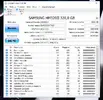
se è capitato una sola volta... comincia a controllare lo stato del disco con crystal disk e posta il risultato
 
disco apposto... ripeto se è successo una volta sola non ti allarmare più di tanto se diventa consuetudine continuiamo le indagini
@Federico83
Circa 10 min fa si è ripresentato il problema,freeze del pc periferiche comprese ma pc che continuava ad andare. Sto notando che da quando è successo la prima volta ogni tanto la tastiera (logitech g110) si freeza di colpo,le uniche cose a funzionare sono la retroilluminazione e lo scroll per alzare ed abbassare il volume.
 
dai una passata con driverbooster3 e vedi se ci sono da aggiornare i driver magari è qualche bug delle periferiche... se si blocca la prossima volta prova solo a premere senza forzare lo spegnimento se gli dai una solo click sul power dovrebbe andare in spegnimento
 
Come immaginavo ho fatto una scansione con driver booster ma tutti i driver sono aggiornati, per il fatto di driver e virus ecc so di essere tranquilllo perche non bazzico siti strani e ci tengo molto al pc. Sinceramente non capisco cosa gli prenda ultimamente visto che non mi aveva mai dato questi problemi
 
Come immaginavo ho fatto una scansione con driver booster ma tutti i driver sono aggiornati, per il fatto di driver e virus ecc so di essere tranquilllo perche non bazzico siti strani e ci tengo molto al pc. Sinceramente non capisco cosa gli prenda ultimamente visto che non mi aveva mai dato questi problemi

probabilmente qualche software che interferisce... hai notato questo comportamento dopo aver installato qualcosa?
 
probabilmente qualche software che interferisce... hai notato questo comportamento dopo aver installato qualcosa?
Installato no,pero' ora che mi ci fai pensare ha cominciato a fare cosi quando ho cominciato ad usare firefox invece che chrome,firefox era gia installato,ho semplicemente fatto l'update della versione ed ho cominciato ad usarlo semplicemente per cambiare browser.Posso provare a disinstallarlo e vedere se il problema in questi giorni si ripresenta.
 
Installato no,pero' ora che mi ci fai pensare ha cominciato a fare cosi quando ho cominciato ad usare firefox invece che chrome,firefox era gia installato,ho semplicemente fatto l'update della versione ed ho cominciato ad usarlo semplicemente per cambiare browser.Posso provare a disinstallarlo e vedere se il problema in questi giorni si ripresenta.

mi sembra strano che firefox faccia fare di questi numeri... ma mai dire mai
 
Disinstallato firefox oggi pomeriggio ma poco fa il pc si è riavviato con schermata blu ed errore Bad_Pool_Header,sinceramente non so cosa stia succedendo :|
 
Pochi minuti fa accendo il pc e con sorpresa non riusciva a caricare l'OS,ho startato whocrashed ed esce questo

crash.webp

Nulla riguardo al crash di ieri sera
 
Ultima modifica:
incolla tutto qui il report.. ad ogni modo hai problemi con virtual box


Welcome to WhoCrashed (HOME EDITION) v 5.52

This program checks for drivers which have been crashing your computer. If your computer has displayed a blue (or black) screen of death, suddenly rebooted or shut down then this program will help you find the root cause and possibly a solution.

Whenever a computer suddenly reboots without displaying any notice or blue (or black) screen of death, the first thing that is often thought about is a hardware failure. In reality, on Windows most crashes are caused by malfunctioning device drivers and kernel modules. In case of a kernel error, many computers do not show a blue screen unless they are configured for this. Instead these systems suddenly reboot without any notice.

This program will analyze your crash dumps with the single click of a button. It will tell you what drivers are likely to be responsible for crashing your computer. It will report a conclusion which offers suggestions on how to proceed in any situation while the analysis report will display internet links which will help you further troubleshoot any detected problems.

To obtain technical support visit www.resplendence.com/support

Click here to check if you have the latest version or if an update is available.

Just click the Analyze button for a comprehensible report ...


Home Edition Notice

This version of WhoCrashed is free for use at home only. If you would like to use this software at work or in a commercial environment you should get the professional edition of WhoCrashed which allows you to perform more thorough and detailed analysis. It also offers a range of additional features such as remote analysis on remote directories and remote computers on the network.

Click here for more information on the professional edition.
Click here to buy the the professional edition of WhoCrashed.


System Information (local)

Computer name: ERONIUS-PC
Windows version: Windows 10 , 10.0, build: 10586
Windows dir: C:\Windows
Hardware: ASRock, H170 Pro4S
CPU: GenuineIntel Intel(R) Pentium(R) CPU G4400 @ 3.30GHz Intel586, level: 6
2 logical processors, active mask: 3
RAM: 8525979648 bytes total


Crash Dump Analysis

Crash dump directory: C:\Windows\Minidump

Crash dumps are enabled on your computer.

On Tue 19/07/2016 11:54:51 GMT your computer crashed
crash dump file: C:\Windows\Minidump\071916-19265-01.dmp
This was probably caused by the following module: xqhdrv.sys (XQHDrv+0x216E3)
Bugcheck code: 0xC4 (0x2000, 0xFFFFF801855116E3, 0x0, 0x54525049)
Error: DRIVER_VERIFIER_DETECTED_VIOLATION
file path: C:\Windows\system32\drivers\xqhdrv.sys
product: BigNox VM VirtualBox
company: BigNox Corporation
description: VirtualBox Support Driver
Bug check description: This is the general bug check code for fatal errors found by Driver Verifier.
This appears to be a typical software driver bug and is not likely to be caused by a hardware problem.
A third party driver was identified as the probable root cause of this system error. It is suggested you look for an update for the following driver: xqhdrv.sys (VirtualBox Support Driver, BigNox Corporation).
Google query: BigNox Corporation DRIVER_VERIFIER_DETECTED_VIOLATION


On Tue 19/07/2016 11:54:51 GMT your computer crashed
crash dump file: C:\Windows\memory.dmp
This was probably caused by the following module: xqhdrv.sys (XQHDrv!RTAssertMsg2+0xFA3)
Bugcheck code: 0xC4 (0x2000, 0xFFFFF801855116E3, 0x0, 0x54525049)
Error: DRIVER_VERIFIER_DETECTED_VIOLATION
file path: C:\Windows\system32\drivers\xqhdrv.sys
product: BigNox VM VirtualBox
company: BigNox Corporation
description: VirtualBox Support Driver
Bug check description: This is the general bug check code for fatal errors found by Driver Verifier.
This appears to be a typical software driver bug and is not likely to be caused by a hardware problem.
A third party driver was identified as the probable root cause of this system error. It is suggested you look for an update for the following driver: xqhdrv.sys (VirtualBox Support Driver, BigNox Corporation).
Google query: BigNox Corporation DRIVER_VERIFIER_DETECTED_VIOLATION


Conclusion

2 crash dumps have been found and analyzed. A third party driver has been identified to be causing system crashes on your computer. It is strongly suggested that you check for updates for these drivers on their company websites. Click on the links below to search with Google for updates for these drivers:

xqhdrv.sys (VirtualBox Support Driver, BigNox Corporation)

If no updates for these drivers are available, try searching with Google on the names of these drivers in combination with the errors that have been reported for these drivers. Include the brand and model name of your computer as well in the query. This often yields interesting results from discussions on the web by users who have been experiencing similar problems.


Read the topic general suggestions for troubleshooting system crashes for more information.

Note that it's not always possible to state with certainty whether a reported driver is responsible for crashing your system or that the root cause is in another module. Nonetheless it's suggested you look for updates for the products that these drivers belong to and regularly visit Windows update or enable automatic updates for Windows. In case a piece of malfunctioning hardware is causing trouble, a search with Google on the bug check errors together with the model name and brand of your computer may help you investigate this further.


Ho disinstallato il programma in questione,praticamente un emulatore android per pc,vediamo se in questi giorni si ripresentano problemi. In questo momento on ho un altro HD altrimenti avrei gia reinstallato tutto sul nuovo.
 
Ultima modifica:
Pubblicità
Pubblicità
Indietro
Top