allora ho provato ad installarlo facendo il download da qui
https://flathub.org/apps/details/com.github.tchx84.Flatseal
ma il risultato è questo
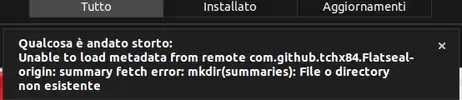
--- i due messaggi sono stati uniti ---
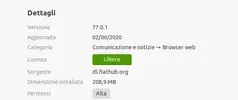
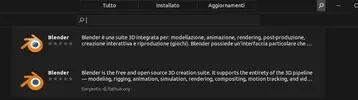
flathub è già installato, se vedi su Blender ti mostra anche la versione da flathub "Sorgente: dl.flathub.org. Sul software center i software vengono mostrati misti, cioè sia da sorgenti flathub che da repository.
Da quel center cerca flatseal, se non ti mostra risultato vuol dire che non è disponibile a 32bit, 32bit ormai non viene più supportato da nessuno.
non c'è, peccato
--- i due messaggi sono stati uniti ---
in realtà non riesco ad installare neanche da terminale, col comando che hai suggerito, esempio:
Codice:
~$ flatpak install blender
Usage:
  flatpak install [OPTION…] LOCATION/REMOTE [REF...] - Install applications or runtimes

Help Options:
  -h, --help              Show help options

Application Options:
  --user                  Work on user installations
  --system                Work on system-wide installations (default)
  --installation=NAME     Work on specific system-wide installation(s)
  --arch=ARCH             Arch to install for
  --no-pull               Don't pull, only install from local cache
  --no-deploy             Don't deploy, only download to local cache
  --no-related            Don't install related refs
  --no-deps               Don't verify/install runtime dependencies
  --no-static-deltas      Don't use static deltas
  --runtime               Look for runtime with the specified name
  --app                   Look for app with the specified name
  --bundle                Assume LOCATION is a .flatpak single-file bundle
  --from                  Assume LOCATION is a .flatpakref application description
  --gpg-file=FILE         Check bundle signatures with GPG key from FILE (- for stdin)
  --subpath=PATH          Only install this subpath
  -y, --assumeyes         Automatically answer yes for all questions
  --reinstall             Uninstall first if already installed
  -v, --verbose           Print debug information during command processing, -vv for more detail
  --ostree-verbose        Print OSTree debug information during command processing

error: REMOTE and REF must be specified
--- i due messaggi sono stati uniti ---
Ok in realtà il comando per installare deve essere tipo
flatpak install flathub org.mozilla.firefox
Find and install hundreds of apps and games for Linux. Enjoy GIMP, GNU Octave, Spotify, Steam and many more!

flathub.org
--- i due messaggi sono stati uniti ---
aggiornamento:
ho voluto provare ad installare ff anche da flathub, avevo già il "classico", dando il comando da sito ufficiale flatpak install flathub org.mozilla.firefox
ma il risultato è stato questo:
Codice:
$ flatpak install flathub org.mozilla.firefox
error: Error searching remote flathub: Can't find ref org.mozilla.firefox
allora ho provato a installare un'altro sw a caso, spotify, sempre con comando da sito ufficile flatpak install flathub com.spotify.Client
e il risultato è stato questo
Codice:
flatpak install flathub com.spotify.Client
Required runtime for com.spotify.Client/i386/stable (runtime/org.freedesktop.Platform/i386/18.08) found in remote flathub
Do you want to install it? [y/n]: y
Installing in system:
org.freedesktop.Platform/i386/18.08              flathub 92d702fced84
org.freedesktop.Platform.Locale/i386/18.08       flathub b5dbe95a90ff
org.freedesktop.Platform.html5-codecs/i386/18.08 flathub 964e29f63869
com.spotify.Client/i386/stable                   flathub 4d56fc878b27
  permissions: ipc, network, pulseaudio, x11, dri
  file access: xdg-music:ro, xdg-pictures:ro
  dbus access: org.freedesktop.Notifications, org.gnome.SessionManager, org.gnome.SettingsDaemon
  dbus ownership: org.mpris.MediaPlayer2.spotify
  tags: proprietary
Is this ok [y/n]: y
Installing: org.freedesktop.Platform/i386/18.08 from flathub
[####################] 786 metadata, 12300 content objects fetched; 285882 KiB t
error: Failed to install org.freedesktop.Platform/i386/18.08: Error deploying: While trying to checkout 92d702fced842f67066e3144d64babb0e640bd60dda95cd7e6dc275d116f3125 into /var/lib/flatpak/runtime/org.freedesktop.Platform/i386/18.08/.92d702fced842f67066e3144d64babb0e640bd60dda95cd7e6dc275d116f3125-GQNZM0: Opening content object e34ded4b720f5bc4caa72be98f14924b33be322d3adaee5072bb8a7af0f9737a: Couldn't find file object 'e34ded4b720f5bc4caa72be98f14924b33be322d3adaee5072bb8a7af0f9737a'
dal centro sw però sono riuscito ad installare un'altra app a caso, calibre.
ora, senza offesa per nessuno, ho fatto esperienza, visto un po' di cose che terrò in considerazione quando metterò linux su macchine più potenti, ma visto che, come abbiamo visto ieri, flatpak non è completamente compatibile con il mio hw, ho deciso di rimuoverlo.
allora ho dato sudo apt purge flatpack, poi il solito autoremove ma mi sono accorto che non ha tolto tutto restano varie cartelle in giro e c'era pure un processo attivo che ho terminato.
se c'è una cosa in cui linux è stra meglio di windows è rimovere cose senza lasciare "sporicizia" negli angoli, quindi come faccio a rimovere tutti i residui di flatpak?
@EmanueleC @pabloski , se avete tempo
ah ho reinstallato quindi snapd come da guida sul loro sito
grazie ancora