PROBLEMA errore critico Kernel-Power 41

  • Autore discussione Autore discussione Pano
  • Data d'inizio Data d'inizio
Pubblicità

Pano

Nuovo Utente
Messaggi
40
Reazioni
0
Punteggio
26
ciao a tutti,

stamattina ho installato W7 Pro N al posto di Vista.
Ho poi notato che in gestione non riconosceva 3 hardware (non ricordo quali), così ho installato, come suggeritomi nell'altro 3d, driver genius che ha installato i driver mancanti e aggiornato gli altri.
Adesso, ogni tanto (una volta anche ora mentre stavo scrivendo questo 3d), il pc si riavvia da solo, con il classico suono come quando lo si spegne forzatamente tenendo premuto il pulsante di accensione (quel "tack" stile interruttore).

Adesso che ricordo, mentre installava i driver, sono andato a giocare alla play e quando son tornato non stava installando i successivi, ma era nella schermata di attesa della pass per avviare windows..... poteva già essere un errore kernel-power me sa

in gestione eventi vedo:Cattura.webp
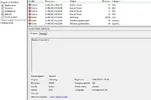
tra l'altro ha già più errori che ore di vita sto os O_O ma che cazz'......

in dettagli XML vedo:
- <Event xmlns="http://schemas.microsoft.com/win/2004/08/events/event">

- <System>
<Provider Name="Microsoft-Windows-Kernel-Power" Guid="{331C3B3A-2005-44C2-AC5E-77220C37D6B4}" />

<EventID>41</EventID>

<Version>2</Version>

<Level>1</Level>

<Task>63</Task>

<Opcode>0</Opcode>

<Keywords>0x8000000000000002</Keywords>

<TimeCreated SystemTime="2013-06-14T11:32:20.674414300Z" />

<EventRecordID>1634</EventRecordID>

<Correlation />

<Execution ProcessID="4" ThreadID="8" />

<Channel>System</Channel>

<Computer>Samuele-Pano-PC</Computer>


<Security UserID="S-1-5-18" />

</System>


- <EventData>
<Data Name="BugcheckCode">0</Data>

<Data Name="BugcheckParameter1">0x0</Data>

<Data Name="BugcheckParameter2">0x0</Data>

<Data Name="BugcheckParameter3">0x0</Data>

<Data Name="BugcheckParameter4">0x0</Data>

<Data Name="SleepInProgress">false</Data>

<Data Name="PowerButtonTimestamp">0</Data>

</EventData>


</Event>


cause? soluzioni??
grazie
 
gli ho fatto fare il crash dump test:

Crash Dump Analysis
Crash dump directory: C:\Windows\Minidump
Crash dumps are enabled on your computer.

On Fri 14/06/2013 17:15:02 GMT your computer crashed
crash dump file: C:\Windows\Minidump\061413-32760-01.dmp
This was probably caused by the following module: rspcrash32.sys (rspCrash32+0x10B2)
Bugcheck code: 0xDEADDEAD (0x0, 0x0, 0x18B33644, 0x3C2A58ED)
Error: MANUALLY_INITIATED_CRASH1
file path: C:\Windows\system32\drivers\rspcrash32.sys
product: WhoCrashed
company: Resplendence Software Projects Sp.
description: Resplendence WhoCrashed Crash Dump Test
Bug check description: This indicates that the user deliberately initiated a crash dump from either the kernel debugger or the keyboard.
This bug check belongs to the crash dump test that you have performed with WhoCrashed or other software. It means that a crash dump file was properly written out.

On Fri 14/06/2013 17:15:02 GMT your computer crashed
crash dump file: C:\Windows\memory.dmp
This was probably caused by the following module: rspcrash32.sys (rspCrash32+0x10B2)
Bugcheck code: 0xDEADDEAD (0x0, 0x0, 0x18B33644, 0x3C2A58ED)
Error: MANUALLY_INITIATED_CRASH1
file path: C:\Windows\system32\drivers\rspcrash32.sys
product: WhoCrashed
company: Resplendence Software Projects Sp.
description: Resplendence WhoCrashed Crash Dump Test
Bug check description: This indicates that the user deliberately initiated a crash dump from either the kernel debugger or the keyboard.
This bug check belongs to the crash dump test that you have performed with WhoCrashed or other software. It means that a crash dump file was properly written out.

- - - Updated - - -

ecco il primo:

Crash dump file: C:\Windows\Minidump\061413-32760-01.dmp
Date/time: 14/06/2013 17:15:02 GMT
Uptime: 01:21:29
Machine: SAMUELE-PANO-PC
Bug check name: MANUALLY_INITIATED_CRASH1
Bug check code: 0xDEADDEAD
Bug check parm 1: 0x0
Bug check parm 2: 0x0
Bug check parm 3: 0x18B33644
Bug check parm 4: 0x3C2A58ED
Probably caused by: rspcrash32.sys
Driver description: Resplendence WhoCrashed Crash Dump Test
Driver product: WhoCrashed
Driver company: Resplendence Software Projects Sp.
OS build: Built by: 7601.18113.x86fre.win7sp1_gdr.130318-1533
Architecture: x86 (32 bit)
CPU count: 2
Page size: 4096

Bug check description:
This indicates that the user deliberately initiated a crash dump from either the kernel debugger or the keyboard.

Comments:
This bug check belongs to the crash dump test that you have performed with WhoCrashed or other software. It means that a crash dump file was properly written out.

- - - Updated - - -

ecco il secondo:

Crash dump file: C:\Windows\memory.dmp
Date/time: 14/06/2013 17:15:02 GMT
Uptime: 01:21:29
Machine: SAMUELE-PANO-PC
Bug check name: MANUALLY_INITIATED_CRASH1
Bug check code: 0xDEADDEAD
Bug check parm 1: 0x0
Bug check parm 2: 0x0
Bug check parm 3: 0x18B33644
Bug check parm 4: 0x3C2A58ED
Probably caused by: rspcrash32.sys
Driver description: Resplendence WhoCrashed Crash Dump Test
Driver product: WhoCrashed
Driver company: Resplendence Software Projects Sp.
OS build: Built by: 7601.18113.x86fre.win7sp1_gdr.130318-1533
Architecture: x86 (32 bit)
CPU count: 2
Page size: 4096

Bug check description:
This indicates that the user deliberately initiated a crash dump from either the kernel debugger or the keyboard.

Comments:
This bug check belongs to the crash dump test that you have performed with WhoCrashed or other software. It means that a crash dump file was properly written out.
 
io leggo questo letteralmente

This indicates that the user deliberately initiated a crash dump from either the kernel debugger or the keyboard.

Ciò indica che l'utente deliberatamente avviato un crash dump sia dal debugger del kernel o la tastiera.


che driver stavi installando?
 
delibertamente?? ma si riferisce al crash test o al crash vero e proprio per volontà di non si sa chi?
ho aggiornato con driver genius tutti quelli che mi indicava come obsoleti
 
bella cavolata alle volte installa driver simili ma non uguali e quindi bluscreen mi capito con delle periferiche audio
 
risolvo subito, reinstallo tutto W7 senza rifare sto errore allora :)
inutile sbattersi la testa e fare 1000 tentativi; tanto da stamattina ad oggi non ho rimesso nulla
grazie dell'aiuto
 
Chiedo venia se mi intrometto nella discussione. Ho anche io lo stesso problema per lo stesso motivo. Non capivo quale problema avesse. Dunque per risolvere basta scaricare i drivers appositi senza usare programmi come driver genius et simili?
 
Chiedo venia se mi intrometto nella discussione. Ho anche io lo stesso problema per lo stesso motivo. Non capivo quale problema avesse. Dunque per risolvere basta scaricare i drivers appositi senza usare programmi come driver genius et simili?

Apri una nuova discussione grazie
 
Pubblicità
Pubblicità
Indietro
Top