Crash improvviso notebook

Pubblicità

Asushepard

Nuovo Utente
Messaggi
8
Reazioni
0
Punteggio
24
Salve a tutti, scrivo qui perchè sono disperatamente in crca di aiuto, è da un po' di giorni che il mio pc portatile (asus k550vx go404t) mi presenta del BOSD mentre guardo video su youtube, l'errore è "dcp watchdog violation", ho già provato svariate cose come aggiornare drivers ecc. ma niente, con whocrashed ho trovato i possibili colpevoli ma ancora non riesco a risolvere il problema. Ora allegherò anche i risultati, qualcuno così gentile mi aiuti per favore. Grazie in anticipo.
 

Allegati

Hai aggiornato i driver con driver booster ?

Oppure prova guida:

Microsoft ha dichiarato che il problema è generalmente dovuto all’incompatibilità del driver iastor.sys con Windows 10, ed è risolvibile sostituendo quest’ultimo con il driver storahci.sys mediante la seguente procedura:

  1. Fai clic con il tasto destro del mouse sull’icona del menù start in basso a sinistra, e seleziona Gestione Dispositivi:
    Dpc-watchdog-violation-Windows-10-Passo-1.png
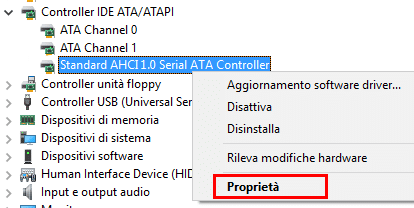
  2. Espandi la voce Controller IDE ATA/ATAPI, quindi fai clic con il tasto destro del mouse sull’elemento che contiene la dicitura SATA AHCI (ad esempio, Standard SATA AHCI Controller) e seleziona Proprietà:
    Dpc-watchdog-violation-Windows-10-Passo-2.png
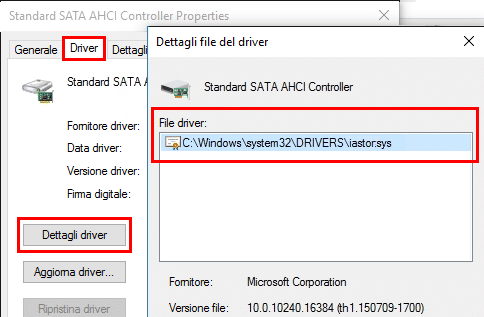
  3. Ora fai clic sulla scheda Driver, quindi su Dettagli Driver. Verifica che il driver iastor.sys sia elencato, poi clicca su OK:
    Dpc-watchdog-violation-Windows-10-Passo-3.png
  4. Sempre dalla scheda Driver, seleziona Aggiorna driver…
  5. Ora scegli l’opzione Cerca il software del driver nel computer:
    Dpc-watchdog-violation-Windows-10-Passo-4.png
  6. Quindi clicca su Scegli manualmente da un elenco di driver di dispositivo nel computer:
    Dpc-watchdog-violation-Windows-10-Passo-5.png
  7. Seleziona Standard SATA AHCI Controller e fai clic su Avanti:
    Dpc-watchdog-violation-Windows-10-Passo-6.png
  8. Terminata l’operazione, fai clic su Chiudi e riavvia il PC.
 
Ti ringrazio tantissimo, ho appena eseguito la procedura, adesso farò qualche test per vedere se il problema si ripresenta, in tal caso provvederò ad allegare i dati di whocrashed, comunque si con driver booster avevo aggiornato praticamente tutto.
 
Sfortunatamente il problema e riapparso, ho controllato nuovamente con whocrashed e questo è il responso:
On Sat 08/07/2017 16:52:30 your computer crashed
crash dump file: C:\Windows\memory.dmp
This was probably caused by the following module: rtwlane.sys (rtwlane+0x30918)
Bugcheck code: 0x133 (0x0, 0x501, 0x500, 0x0)
Error: DPC_WATCHDOG_VIOLATION
file path: C:\Windows\system32\drivers\rtwlane.sys
product: Realtek PCIEWireless LAN PCI-E NIC
company: Realtek Semiconductor Corporation
description: Realtek PCIE NDIS Driver 42654
Bug check description: The DPC watchdog detected a prolonged run time at an IRQL of DISPATCH_LEVEL or above.
This appears to be a typical software driver bug and is not likely to be caused by a hardware problem. This problem might also be caused because of overheating (thermal issue).
A third party driver was identified as the probable root cause of this system error. It is suggested you look for an update for the following driver: rtwlane.sys (Realtek PCIE NDIS Driver 42654, Realtek Semiconductor Corporation ).
Google query: Realtek Semiconductor Corporation DPC_WATCHDOG_VIOLATION

I drivers a cui fa riferimento ho controllato e sono i più aggiornati possibili, grazie e scusa il disturbo.
 
Sfortunatamente il problema e riapparso, ho controllato nuovamente con whocrashed e questo è il responso:
On Sat 08/07/2017 16:52:30 your computer crashed
crash dump file: C:\Windows\memory.dmp
This was probably caused by the following module: rtwlane.sys (rtwlane+0x30918)
Bugcheck code: 0x133 (0x0, 0x501, 0x500, 0x0)
Error: DPC_WATCHDOG_VIOLATION
file path: C:\Windows\system32\drivers\rtwlane.sys
product: Realtek PCIEWireless LAN PCI-E NIC
company: Realtek Semiconductor Corporation
description: Realtek PCIE NDIS Driver 42654
Bug check description: The DPC watchdog detected a prolonged run time at an IRQL of DISPATCH_LEVEL or above.
This appears to be a typical software driver bug and is not likely to be caused by a hardware problem. This problem might also be caused because of overheating (thermal issue).
A third party driver was identified as the probable root cause of this system error. It is suggested you look for an update for the following driver: rtwlane.sys (Realtek PCIE NDIS Driver 42654, Realtek Semiconductor Corporation ).
Google query: Realtek Semiconductor Corporation DPC_WATCHDOG_VIOLATION

I drivers a cui fa riferimento ho controllato e sono i più aggiornati possibili, grazie e scusa il disturbo.

Mmmm, si potrebbe provare a reinstallare windows
 
Pubblicità
Pubblicità
Indietro
Top