PROBLEMA Continue Schermate Blu Windows 10

Pubblicità

gaetano_98

Nuovo Utente
Messaggi
110
Reazioni
1
Punteggio
38
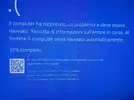
Ciao a tutti, ho da poco assemblato io mio pc ma appena lo accendo dopo tipo 20 min appare la schermata blu con il seguente riavvio.. sarà perché non ho una scheda video dedicata? (Mi deve arrivare) ho installato anche i driver Intel..
Windows è installato in una ssd.
Allego foto del problema.
 

Allegati

  • 20170105_151726.webp
    20170105_151726.webp
    5.7 MB · Visualizzazioni: 87
ho fatto l'analisi con il programma e mi dice questo:

On Wed 04/01/2017 22:46:42 your computer crashed
crash dump file: C:\Windows\Minidump\010417-5015-01.dmp
This was probably caused by the following module: eraserutildrv11510.sys (0xFFFFF80A1EE5D618)
Bugcheck code: 0x50 (0xFFFFF6FB7DBEDA18, 0x0, 0xFFFFF80A1EE5D618, 0x2)
Error: PAGE_FAULT_IN_NONPAGED_AREA
Bug check description: This indicates that invalid system memory has been referenced.
This appears to be a typical software driver bug and is not likely to be caused by a hardware problem.
A third party driver was identified as the probable root cause of this system error. It is suggested you look for an update for the following driver: eraserutildrv11510.sys .
Google query: eraserutildrv11510.sys PAGE_FAULT_IN_NONPAGED_AREA


Conclusion
5 crash dumps have been found and analyzed. 2 third party drivers have been identified to be causing system crashes on your computer. It is strongly suggested that you check for updates for these drivers on their company websites. Click on the links below to search with Google for updates for these drivers:

eraserutilrebootdrv.sys (Symantec Eraser Utility Driver, Symantec Corporation)
eraserutildrv11510.sys

If no updates for these drivers are available, try searching with Google on the names of these drivers in combination with the errors that have been reported for these drivers. Include the brand and model name of your computer as well in the query. This often yields interesting results from discussions on the web by users who have been experiencing similar problems.


Read the topic general suggestions for troubleshooting system crashes for more information.

Note that it's not always possible to state with certainty whether a reported driver is responsible for crashing your system or that the root cause is in another module. Nonetheless it's suggested you look for updates for the products that these drivers belong to and regularly visit Windows update or enable automatic updates for Windows. In case a piece of malfunctioning hardware is causing trouble, a search with Google on the bug check errors together with the model name and brand of your computer may help you investigate this further.
 
Di quali? Perché avevo i driver nvidia ma ora mi arriverà una scheda amd, tolgo i driver nvidia? Può essere quello?
 
Ma in che senso pulita?
Disinstallando i driver che ci sono ora con DDU (http://www.guru3d.com/files-details/display-driver-uninstaller-download.html) e reinstallandoli.
Guida: http://gamesresources.forumfree.it/?t=69942661 (è la prima che ho trovato)
Guida qui su tom's: https://www.tomshw.it/forum/threads...el-con-ddu-display-driver-uninstaller.515174/

Di quali? Perché avevo i driver nvidia ma ora mi arriverà una scheda amd, tolgo i driver nvidia? Può essere quello?
Te prova a reinstallarli tutti, se quelli di nvidia non ti servono più è inutile che li rimetti.
 
da quello che dice l'analisi, sembra un problema di Symantec (strano vero ?) Erase Utility.
prova a disinstallarlo.
 
Disinstallando i driver che ci sono ora con DDU (http://www.guru3d.com/files-details/display-driver-uninstaller-download.html) e reinstallandoli.
Guida: http://gamesresources.forumfree.it/?t=69942661 (è la prima che ho trovato)
Guida qui su tom's: https://www.tomshw.it/forum/threads...el-con-ddu-display-driver-uninstaller.515174/


Te prova a reinstallarli tutti, se quelli di nvidia non ti servono più è inutile che li rimetti.

ho provato a farlo 2 volte con 2 versioni diverse di driver intel ma non funziona.... sapresti aiutarmi perfavore...
 
Hai cambiato qualcosa dal BIOS? L ha fatto anche a me e stavo facendo un po' di overlock al processore... E si é riavviato di continuo un botto di volte... Ho caricato il default dal bios e si é sistemato... Poi ho d nuovo iniziato l overlock e ed é andato bene... Stavo sbagliando

Inviato dal mio GT-I9515 utilizzando Tapatalk
 
Pubblicità
Pubblicità
Indietro
Top