RISOLTO CefSharp Click

Pubblicità
Stato
Discussione chiusa ad ulteriori risposte.

OttoOtti

Nuovo Utente
Messaggi
83
Reazioni
7
Punteggio
26
Ciao ho riscontrato questo errore è non capisco il motivo sto utilizzando c# wpf e CefSharp sto cercando di emulare un click virtuale in CefSharp sul webbrowser ma mi da errore : immagine e nello spoiler questo è il codice che sto utilizzando perché mi da errore ?
C#:
public void web()
        {
            browser_2.GetBrowser().GetHost().SendMouseClickEvent(0, 0, MouseButtonType.Left, false, 1, CefEventFlags.None);
            System.Threading.Thread.Sleep(100);
            browser_2.GetBrowser().GetHost().SendMouseClickEvent(0, 0, MouseButtonType.Left, true, 1, CefEventFlags.None);
            //browser_2.GetBrowser().GetHost().SendMouseMoveEvent();
        }
350737
 
Ciao ho riscontrato questo errore è non capisco il motivo sto utilizzando c# wpf e CefSharp sto cercando di emulare un click virtuale in CefSharp sul webbrowser ma mi da errore : immagine e nello spoiler questo è il codice che sto utilizzando perché mi da errore ?
C#:
public void web()
{
browser_2.GetBrowser().GetHost().SendMouseClickEvent(0, 0, MouseButtonType.Left, false, 1, CefEventFlags.None);
System.Threading.Thread.Sleep(100);
browser_2.GetBrowser().GetHost().SendMouseClickEvent(0, 0, MouseButtonType.Left, true, 1, CefEventFlags.None);
//browser_2.GetBrowser().GetHost().SendMouseMoveEvent();
}
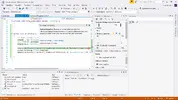
L'eccezione che si crea indica che tu non hai inizializzato alcun browser!
 
non sono molto esperto in c# ma lo fatto con wpf e id e proprio browser_2 cosa altro dovrei dichiarare ?
 
cosi ho sbagliato ? Mursey mi aiuti sempre grazie :thanks:

Codice:
<cefSharp:ChromiumWebBrowser x:Name="browser_2" Panel.ZIndex="-1" Grid.Row="0" Width="{Binding ActualWidth, ElementName=Body}" Height="{Binding ActualHeight, ElementName=Body}" Address="index.html" ></cefSharp:ChromiumWebBrowser>
 
Ultima modifica:
Se guardi la Documentazione, dice esplicitamente che GetBrowser puo' essere null, e spulciando piu' sotto ho trovato anche il metodo CreateBrowser che probabilmente serve per inizializzarlo. Ho messo in italico perche' non so assolutamente cosa faccia quella class, mai usata. E' anche possibile che chiami GetBrowser PRIMA che il controllo sia formalizzato. Ripeto, le mie sono congetture.
Forse ti conviene cercare un tutorial che spiega come usarlo (ne ho visto sul Sito Ufficiale)
 
cosi ho sbagliato ? Mursey mi aiuti sempre grazie :thanks:

Codice:
<cefSharp:ChromiumWebBrowser x:Name="browser_2" Panel.ZIndex="-1" Grid.Row="0" Width="{Binding ActualWidth, ElementName=Body}" Height="{Binding ActualHeight, ElementName=Body}" Address="index.html" ></cefSharp:ChromiumWebBrowser>
Non lo ho mai usato da wpf, prova a creare l'istanza da codice seguendo https://www.codeproject.com/Tips/648678/Embedding-Chrome-in-a-WPF-VB-NET-Application-using
 
ho provato a fare come mi hai detto ma mi da un altro errore
C#:
using System;
using System.Collections.Generic;
using System.ComponentModel;
using System.Data;
using System.Drawing;
using System.Linq;
using System.Text;
using System.Threading.Tasks;
using System.Windows.Forms;
using CefSharp;
using CefSharp.WinForms;

namespace test
{
    public partial class Form1 : Form
    {
        public ChromiumWebBrowser browser;

        public Form1()
        {
            InitializeComponent();
            InitBrowser();
        }

        private void Form1_Load(object sender, EventArgs e)
        {
            
        }

        
        public void InitBrowser()
        {
            Cef.Initialize(new CefSettings());
            browser = new ChromiumWebBrowser("www.google.com");
            this.Controls.Add(browser);
            browser.Dock = DockStyle.Fill;

            //browser.IsBrowserInitializedChanged += new (click);
        }
        public event EventHandler<IsBrowserInitializedChangedEventArgs> IsBrowserInitializedChanged;
        public void click()
        {           
            browser.GetBrowser().GetHost().SendMouseClickEvent(0, 0, MouseButtonType.Left, false, 1, CefEventFlags.None);
            System.Threading.Thread.Sleep(100);
            browser.GetBrowser().GetHost().SendMouseClickEvent(0, 0, MouseButtonType.Left, true, 1, CefEventFlags.None);
        }

    }
}
350811
 
Ultima modifica:
cosa dovrei fare sotto forma di codice ? :suicidio: seno come posso dire di eseguire il click dopo avere inizializzato ?
browser.IsBrowserInitializedChanged += new (click); un cosa cosi ?
--- i due messaggi sono stati uniti ---
RISOLTO :brindiamo: gRAZIE A TUTTI <3 come sempre adesso funziona pero avrei un altra domanda sempre riguarda alla stessa cosa c'e un codice simile che pero invia i caratteri browser.GetBrowser().GetHost().SendKeyEvent(); pero non so cosa devo mettere come dati dentro qualche aiuto cosi ho risolto tutto
C#:
using System;
using System.Collections.Generic;
using System.ComponentModel;
using System.Data;
using System.Drawing;
using System.Linq;
using System.Text;
using System.Threading.Tasks;
using System.Windows.Forms;
using CefSharp;
using CefSharp.WinForms;

namespace test
{
    public partial class Form1 : Form
    {
        public ChromiumWebBrowser browser;

        public Form1()
        {
            InitializeComponent();
            InitBrowser();
        }

        private void Form1_Load(object sender, EventArgs e)
        {
            timer1.Start();
        }

       
        public void InitBrowser()
        {
            Cef.Initialize(new CefSettings());
            browser = new ChromiumWebBrowser("www.google.com");
            this.Controls.Add(browser);
            browser.Dock = DockStyle.Fill;          
        }

        public void click()
        {          
            browser.GetBrowser().GetHost().SendMouseClickEvent(500, 200, MouseButtonType.Left, false, 1, CefEventFlags.None);
            System.Threading.Thread.Sleep(100);
            browser.GetBrowser().GetHost().SendMouseClickEvent(500, 200, MouseButtonType.Left, true, 1, CefEventFlags.None);
        }

        private void timer1_Tick(object sender, EventArgs e)
        {
            if (browser.IsBrowserInitialized)
            {
                click();
            }
        }
    }
}
come potete vedere ha cliccato il banner di google
350820
 
Ultima modifica:
browser.GetBrowser().GetHost().SendKeyEvent(); pero non so cosa devo mettere come dati dentro
Il parametro che accetta è un oggetto KeyEvent, quindi una struttura con le informazioni dell'evento come se l'utente avesse premuto i tasti.
Ecco un esempio:
C#:
static void SendKeys(ChromiumWebBrowser browser)
{
    KeyEvent[] events = new KeyEvent[] {
        new KeyEvent() { FocusOnEditableField = true, WindowsKeyCode = GetCharsFromKeys(Keys.R, false, false)[0], Modifiers = CefEventFlags.None, Type = KeyEventType.Char, IsSystemKey = false }, // Just the letter R, no shift (so no caps...?)
        new KeyEvent() { FocusOnEditableField = true, WindowsKeyCode = GetCharsFromKeys(Keys.R, true, false)[0], Modifiers = CefEventFlags.ShiftDown, Type = KeyEventType.Char, IsSystemKey = false }, // Capital R?
        new KeyEvent() { FocusOnEditableField = true, WindowsKeyCode = GetCharsFromKeys(Keys.D4, false, false)[0], Modifiers = CefEventFlags.None, Type = KeyEventType.Char, IsSystemKey = false }, // Just the number 4
        new KeyEvent() { FocusOnEditableField = true, WindowsKeyCode = GetCharsFromKeys(Keys.D4, true, false)[0], Modifiers = CefEventFlags.ShiftDown, Type = KeyEventType.Char, IsSystemKey = false }, // Shift 4 (should be $)
    };

    foreach (KeyEvent ev in events) {
        Thread.Sleep(100);
        browser.GetBrowser().GetHost().SendKeyEvent(ev);
    }
}
La funzione (fonte) crea una lista di eventi e li scatena.
 
grazie mille Mursey come sempre :ok::ok: ho risolto tutto :D spero che quest post possa essere utile a qualcuno che voglia fare una cosa simile ;)
 
Stato
Discussione chiusa ad ulteriori risposte.
Pubblicità
Pubblicità
Indietro
Top