PROBLEMA Aiuto problema schermata blu della morte!!!

Pubblicità

ilrePinna

Nuovo Utente
Messaggi
43
Reazioni
0
Punteggio
26
Ciao a tutti ho questo computer da circa 1 settimana e mezza.
Ho avuto 4 bsod.
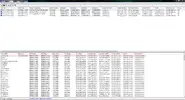
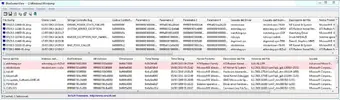
Ho fatto i test con Bluescreenviews.
Ho aggiornato i driver della scheda video e di directx.
ok adesso posto gli screen
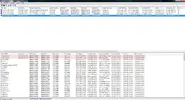
Cattura1.webpCattura2.webpCattura3.webpCattura4.webp
Grz ho bisogno di aiuto sto impazzendo:retard::utonto::luxhello::hihi::sisilui::lol:
 
Sembrerebbe un problema alla sezione video.
Se possibile disinstallare la scheda video, rimuoverla fisicamente dalla MB e collegare il monitor alla vga integrata (se presente).
Atro test da fare è quello alla ram con memtest da pendrive avviabile.
 
ok vuoi gli screen di whocrashed ? ho scaricato msi afterburner e ho aumentato l utilizzo delle ventole che era basso ora mentre gioco 50° di vga e 40° di cpu e nn dovrei avere problemi di surriscaldamento sto per fare un memtest vi farò sapere io sono propenso che il problema sia ntoskrnl.exe che con bluescreenview me lo dava errore sempre tranne per una volta che la va si era surriscaldata troppo
 
Ultima modifica:
ok vuoi gli screen di whocrashed ? ho scaricato msi afterburner e ho aumentato l utilizzo delle ventole che era basso ora mentre gioco 50° di vga e 40° di cpu e nn dovrei avere problemi di surriscaldamento sto per fare un memtest vi farò sapere io sono propenso che il problema sia ntoskrnl.exe che con bluescreenview me lo dava errore sempre tranne per una volta che la va si era surriscaldata troppo

da whocrashed copi il testo e lo incolli intanto facci sapere come procede dopo aver aumentato la rotazione della ventola
 
dopo ave aumentato i giri l ho scritto gia sopra. ho fatto i memtest e nn mi ha dato errori l unica cosa che mi rimane è il ntoskrnl.exe

- - - Updated - - -

ecco:


computer name: MATTEO-PC
windows version: Windows 7 Service Pack 1, 6.1, build: 7601
windows dir: C:\Windows
CPU: AuthenticAMD AMD A8-5600K APU with Radeon(tm) HD Graphics AMD586, level: 21
4 logical processors, active mask: 15
RAM: 8537903104 total
VM: 2147352576, free: 1944612864


Crash Dump Analysis

Crash dump directory: C:\Windows\Minidump

Crash dumps are enabled on your computer.

On Sat 20/07/2013 12:39:19 GMT your computer crashed
crash dump file: C:\Windows\Minidump\072013-10218-01.dmp
This was probably caused by the following module: ntoskrnl.exe (nt+0x75C00)
Bugcheck code: 0xC2 (0x50, 0xFFFFF8A012E6B000, 0x12E6B, 0x2000000000)
Error: BAD_POOL_CALLER
file path: C:\Windows\system32\ntoskrnl.exe
product: Microsoft® Windows® Operating System
company: Microsoft Corporation
description: NT Kernel & System
Bug check description: This indicates that the current thread is making a bad pool request.
This appears to be a typical software driver bug and is not likely to be caused by a hardware problem.
The crash took place in the Windows kernel. Possibly this problem is caused by another driver that cannot be identified at this time.


On Sat 20/07/2013 12:39:19 GMT your computer crashed
crash dump file: C:\Windows\memory.dmp
This was probably caused by the following module: ntkrnlmp.exe (nt!KeBugCheckEx+0x0)
Bugcheck code: 0xC2 (0x50, 0xFFFFF8A012E6B000, 0x12E6B, 0x2000000000)
Error: BAD_POOL_CALLER
Bug check description: This indicates that the current thread is making a bad pool request.
This appears to be a typical software driver bug and is not likely to be caused by a hardware problem.
The crash took place in the Windows kernel. Possibly this problem is caused by another driver that cannot be identified at this time.


On Wed 17/07/2013 14:33:36 GMT your computer crashed
crash dump file: C:\Windows\Minidump\071713-11466-01.dmp
This was probably caused by the following module: ntoskrnl.exe (nt+0x75C00)
Bugcheck code: 0x101 (0x31, 0x0, 0xFFFFF88002F65180, 0x2)
Error: CLOCK_WATCHDOG_TIMEOUT
file path: C:\Windows\system32\ntoskrnl.exe
product: Microsoft® Windows® Operating System
company: Microsoft Corporation
description: NT Kernel & System
Bug check description: This indicates that an expected clock interrupt on a secondary processor, in a multi-processor system, was not received within the allocated interval.
This appears to be a typical software driver bug and is not likely to be caused by a hardware problem. This problem might be caused by a thermal issue.
The crash took place in the Windows kernel. Possibly this problem is caused by another driver that cannot be identified at this time.


On Wed 17/07/2013 12:24:31 GMT your computer crashed
crash dump file: C:\Windows\Minidump\071713-10374-01.dmp
This was probably caused by the following module: ntoskrnl.exe (nt+0x75BD0)
Bugcheck code: 0x1E (0x0, 0x0, 0x0, 0x0)
Error: KMODE_EXCEPTION_NOT_HANDLED
file path: C:\Windows\system32\ntoskrnl.exe
product: Microsoft® Windows® Operating System
company: Microsoft Corporation
description: NT Kernel & System
Bug check description: This indicates that a kernel-mode program generated an exception which the error handler did not catch.
This appears to be a typical software driver bug and is not likely to be caused by a hardware problem.
The crash took place in the Windows kernel. Possibly this problem is caused by another driver that cannot be identified at this time.


On Fri 12/07/2013 09:03:17 GMT your computer crashed
crash dump file: C:\Windows\Minidump\071213-10857-01.dmp
This was probably caused by the following module: watchdog.sys (watchdog+0x122F)
Bugcheck code: 0x10E (0xC, 0xFFFFFA80092D1830, 0x0, 0x0)
Error: VIDEO_MEMORY_MANAGEMENT_INTERNAL
file path: C:\Windows\system32\drivers\watchdog.sys
product: Microsoft® Windows® Operating System
company: Microsoft Corporation
description: Watchdog Driver
Bug check description: This indicates that the video memory manager has encountered a condition that it is unable to recover from.
The crash took place in a standard Microsoft module. Your system configuration may be incorrect. Possibly this problem is caused by another driver on your system that cannot be identified at this time.


On Wed 03/07/2013 12:28:15 GMT your computer crashed
crash dump file: C:\Windows\Minidump\070313-12246-01.dmp
This was probably caused by the following module: dxgkrnl.sys (dxgkrnl+0xD644)
Bugcheck code: 0x3B (0xC0000005, 0xFFFFF88002C1E644, 0xFFFFF88007BC08F0, 0x0)
Error: SYSTEM_SERVICE_EXCEPTION
file path: C:\Windows\system32\drivers\dxgkrnl.sys
product: Microsoft® Windows® Operating System
company: Microsoft Corporation
description: DirectX Graphics Kernel
Bug check description: This indicates that an exception happened while executing a routine that transitions from non-privileged code to privileged code.
This appears to be a typical software driver bug and is not likely to be caused by a hardware problem.
The crash took place in a standard Microsoft module. Your system configuration may be incorrect. Possibly this problem is caused by another driver on your system that cannot be identified at this time.


On Tue 02/07/2013 13:54:01 GMT your computer crashed
crash dump file: C:\Windows\Minidump\070213-11809-01.dmp
This was probably caused by the following module: ntoskrnl.exe (nt+0x75C00)
Bugcheck code: 0x9F (0x3, 0xFFFFFA8006A29BB0, 0xFFFFF800044003D8, 0xFFFFFA800AA26220)
Error: DRIVER_POWER_STATE_FAILURE
file path: C:\Windows\system32\ntoskrnl.exe
product: Microsoft® Windows® Operating System
company: Microsoft Corporation
description: NT Kernel & System
Bug check description: This bug check indicates that the driver is in an inconsistent or invalid power state.
This appears to be a typical software driver bug and is not likely to be caused by a hardware problem.
The crash took place in the Windows kernel. Possibly this problem is caused by another driver that cannot be identified at this time.


On Mon 01/07/2013 13:08:49 GMT your computer crashed
crash dump file: C:\Windows\Minidump\070113-17908-01.dmp
This was probably caused by the following module: ntoskrnl.exe (nt+0x75C00)
Bugcheck code: 0x50 (0xFFFFF8A01EC8B088, 0x0, 0xFFFFF80002ECDDE9, 0x2)
Error: PAGE_FAULT_IN_NONPAGED_AREA
file path: C:\Windows\system32\ntoskrnl.exe
product: Microsoft® Windows® Operating System
company: Microsoft Corporation
description: NT Kernel & System
Bug check description: This indicates that invalid system memory has been referenced.
This appears to be a typical software driver bug and is not likely to be caused by a hardware problem.
The crash took place in the Windows kernel. Possibly this problem is caused by another driver that cannot be identified at this time.


Conclusion

8 crash dumps have been found and analyzed. No offending third party drivers have been found. Consider configuring your system to produce a full memory dump for better analysis.


Read the topic general suggestions for troubleshooting system crashes for more information.

Note that it's not always possible to state with certainty whether a reported driver is actually responsible for crashing your system or that the root cause is in another module. Nonetheless it's suggested you look for updates for the products that these drivers belong to and regularly visit Windows update or enable automatic updates for Windows. In case a piece of malfunctioning hardware is causing trouble, a search with Google on the bug check errors together with the model name and brand of your computer may help you investigate this further.ù

p.s. si mi chiamo matteo XD

 
ne è venuto un altro praticamente ora:
Cattura.webp
[FONT=Segoe UI, Arial]On Fri 26/07/2013 15:19:17 GMT your computer crashed
crash dump file: C:\Windows\Minidump\072613-9890-01.dmp
This was probably caused by the following module: [FONT=Segoe UI, Arial]ntoskrnl.exe[/FONT] (nt+0x75C00)
Bugcheck code: 0x101 (0x31, 0x0, 0xFFFFF88002F65180, 0x2)
Error: [FONT=Segoe UI, Arial]CLOCK_WATCHDOG_TIMEOUT[/FONT]
file path: C:\Windows\system32\ntoskrnl.exe
product: [FONT=Segoe UI, Arial]Microsoft® Windows® Operating System[/FONT]
company: [FONT=Segoe UI, Arial]Microsoft Corporation[/FONT]
description: NT Kernel & System
Bug check description: This indicates that an expected clock interrupt on a secondary processor, in a multi-processor system, was not received within the allocated interval.
This appears to be a typical software driver bug and is not likely to be caused by a hardware problem. This problem might be caused by a thermal issue.
The crash took place in the Windows kernel. Possibly this problem is caused by another driver that cannot be identified at this time.
[/FONT]
 
ma se cambio cpu posso riprendere la stessa oppure devo proprio cambiare proprio il modello della cpu?
n.b. credo che lunedi resetto tutto e reinstallo driver per driver comunque puoi spiegarmi il problema bene perché nn l'ho capito :boh:
 
Ultima modifica:
ok se ti serve qualche informazione che ti può aiutare dimmelo sennò faccio prima a rispedirli tutti e due tanto ho preso tutti i componenti da eke*y
 
Pubblicità
Pubblicità
Indietro
Top